— 人來過
HIGGSFIELD GENJUTSU 中文教學

國外瘋傳的 Higgsfield Genjutsu 中文版教學

一支手機影片,換掉車、衣服、背景,動作表情鏡頭都照原片

← 返回首頁關於我·免費教學·Instagram

Higgsfield Genjutsu 是 Higgsfield 的影片換物件功能:上傳一支手機影片和幾張參考圖,它只換掉你指定的東西,人的動作、表情、聲音和鏡頭都照原片。2026 年 9 月我在 IG 滑到 Timur Mano(@iinsightri)用它把玩具車變成跑車的影片,照他公開的方法自己做了一遍,這頁是中文整理,加上我自己踩到的坑。

成品先看

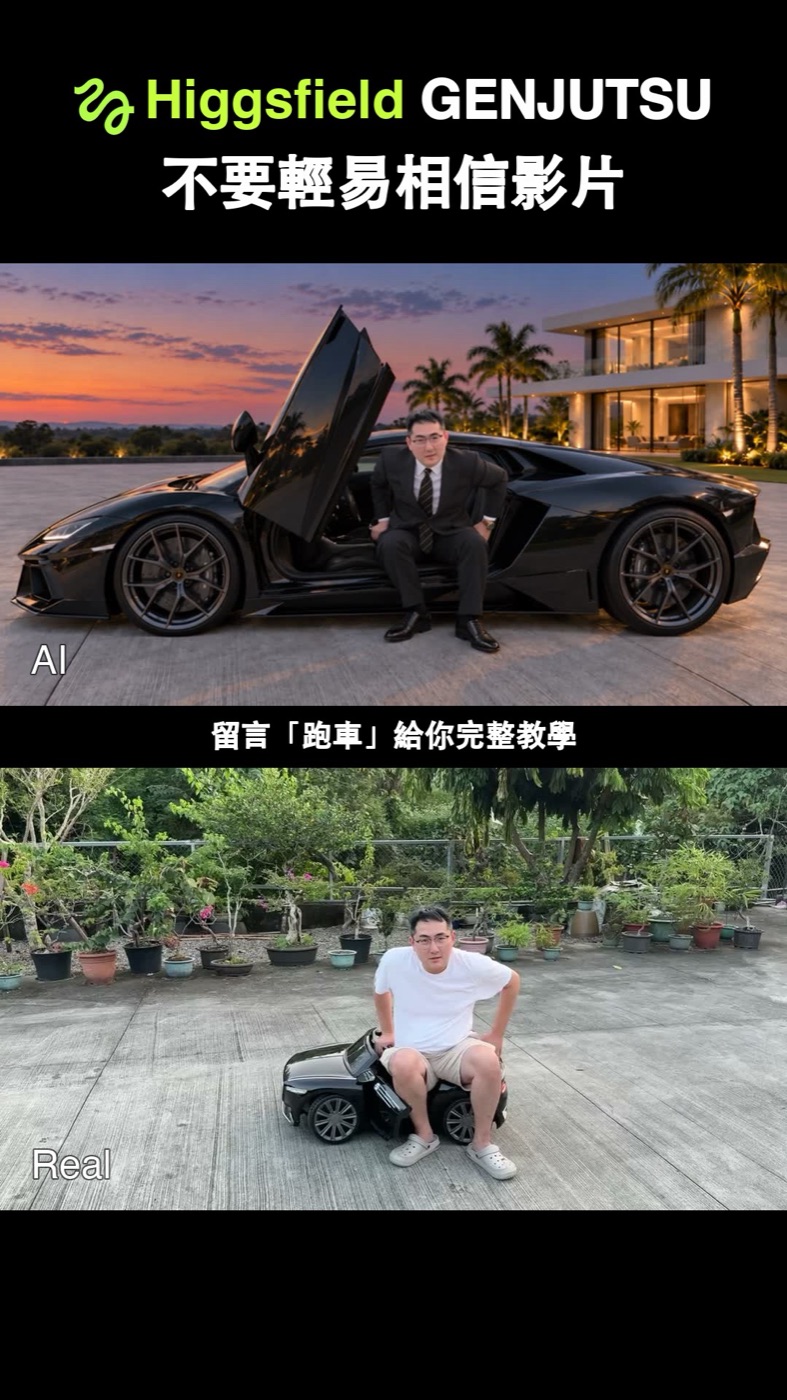
Higgsfield Genjutsu 前後對比封面:上半是 AI 版,穿西裝坐在黑色超跑的剪刀門旁、背景是黃昏的豪宅;下半是原片,穿白 T 恤短褲坐在玩具車上、背景是盆栽和水泥地
上面是 Genjutsu 生成的版本,下面是我用手機拍的原片。車、衣服、鞋子、背景都換掉了,姿勢和鏡頭位置照原片。

會用到的工具

四個步驟串起來,手機拍到 IG 發文

手機拍 30 秒內的原片
ChatGPT生參考圖
HiggsfieldGenjutsu 換物件
Instagram前後對比發文

另外需要一個能轉檔的工具(ffmpeg 或 CapCut 電腦版)。寫提示詞可以找 Claude 或 ChatGPT 幫忙,Timur 在教學裡也建議把他的文件丟給 Claude 或你習慣的 AI,讓它陪你一起做。

八個步驟

照 Timur 的教學整理,綠框是我自己做的時候多學到的

1

拍一支 30 秒內的原片

  • 長度Genjutsu 一次最長 30 秒,我的原片是 29 秒
  • 道具要換的東西先用玩具或道具佔位置。我用玩具車代表跑車、踏凳代表飛機的登機梯,旁邊再擺一架玩具飛機
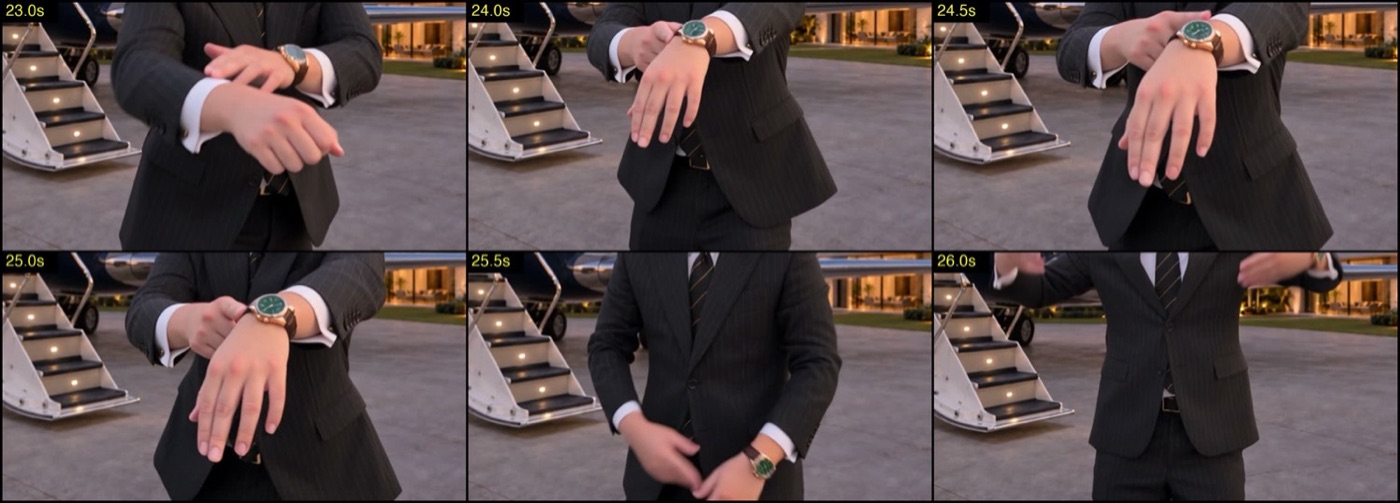
  • 時間拍完逐秒看一次,記下每個動作在第幾秒發生(坐著講話、站起來、轉身、指過去、踩上去)。Timur 說這是讓成果乾淨的關鍵,也是最多人跳過的一步
小提醒記下來的時間點可以丟給 Claude 或 ChatGPT,請它整理成一張「幾秒到幾秒:原片在做什麼、AI 要換成什麼」的表,下一步寫提示詞就照這張表寫。
2

轉成 1080p、24fps、整數秒

  • 原因Genjutsu 固定輸出 24fps、最高 1080p。輸入就給 24fps,每一格剛好對到輸出的一格;長度有小數秒的話,它會自己補到下一個整秒
  • HDRiPhone 預設拍 HDR,要先轉成 SDR。Timur 第一次沒轉,出來的帽 T 變紫色、草地變灰色;在 CapCut 電腦版把專案色彩設成 SDR 再匯出就好了

Timur 教學裡的 ffmpeg 指令(輸入檔已經是 SDR)

ffmpeg -i input_sdr.mov -vf "scale=1920:1080" -r 24 -c:v libx264 -crf 16 -pix_fmt yuv420p -c:a aac source_1080p24.mp4

要順便剪成整數秒,可以在輸出檔名前加 -t 29(29 換成你要的秒數)。

3

用 ChatGPT 生參考圖

  • 一物衣服、鞋子、背景、每隻錶都各一張,白底或乾淨背景
  • 無字錶面品牌、車牌、標籤上的小字生出來會變亂碼,看得出商標的圖也可能被擋,先裁掉或模糊
  • 角度跟影片裡會看到的角度差不多。車用斜前方,衣服用正面;戴在身上的東西,用「戴著的照片」效果比平放的商品照好
我的關鍵心得車和飛機這種大物件,只給一張白底商品圖的話,它會照玩具的大小塞進去。我改成截一格原片丟給 ChatGPT,請它把玩具換成真實尺寸的車和飛機,生出「我坐在車旁」「我站在飛機旁」的定稿圖,再拿這兩張當參考圖,比例就對了。下面「過程範例」有前後對照,「英文提示詞」那段有我用的提示詞。
4

在 Genjutsu 選 Object Swap,上傳影片和參考圖

  • 打開higgsfield.ai 的 Genjutsu 頁面,模式選 Object Swap(只換你點名的東西,其他照原片)
  • 上傳先傳影片,再依序傳參考圖。提示詞裡的 @Image1、@Image2 就是上傳順序,順序錯了就會換錯東西
  • 另外Motion Transfer 會保留動作和運鏡、整個場景重建。要換到完全不同的地方才用它;只換物件用 Object Swap
5

用 TASK - VIDEO EDIT 範本寫提示詞

  • 一行一行一個指令:幾秒到幾秒、換什麼、用哪張圖、放哪裡
  • 動詞畫面裡本來就有的東西寫 Replace only,本來沒有的寫 Add only
  • 時間時間範圍的起點和終點放在動作上(站起來、轉身),別切在人靜止講話的中間,切在靜止處會看得出東西突然跳出來。整段都在的東西(衣服、錶)直接寫整段時間
  • 描述用外觀描述,不寫品牌名,品牌名會讓提示詞被擋
  • 長度越短越穩。Timur 的建議是 1,400 字元以內,太長網站會直接拒收

範本和完整提示詞在下面「英文提示詞」,可以直接複製。

6

先用 480p 測,逐格檢查

  • 便宜我 29 秒的影片,480p 一次 87 點,1080p 一次 319 點(Plus 方案折扣後)
  • 逐格別只播一次看感覺。暫停在特寫、轉場、手腕這些地方,放大看,錯誤都藏在這裡
  • 一句車不對就只改車那一行,錶不對就只改錶那一行,這樣才知道是哪一句造成的
  • 等一次生成要 10 到 20 分鐘,看起來卡住也別重送(Timur 的提醒)
7

滿意再出 1080p

  • 做用同一份提示詞,解析度改成 1080p 再生成一次
  • 注意480p 好看的,1080p 大多也會好,但不保證。Timur 那兩隻錶,在 1080p 試了四次
  • 加工Timur 最後會再用 Higgsfield 的 ByteDance Upscaler 放大到 4K、補成 60fps,他 27 秒的影片這步花 42 點
8

做前後對比版,發 IG

  • 原因Timur 說讓人轉發的是前後對比。只放 AI 版是一支好看的影片,放在原片旁邊才有「原來是玩具車」的笑點
  • 對齊Genjutsu 會保留原片的長度和動作,兩個檔案丟進時間軸就對齊了,上下疊或在任何一格硬切都可以
  • 聲音直接用原片的聲音,兩個版本共用一條

過程範例:我實際跑出來的結果

2026-09-29 實際生成,點圖可以看大圖

第一次

車和飛機都太小

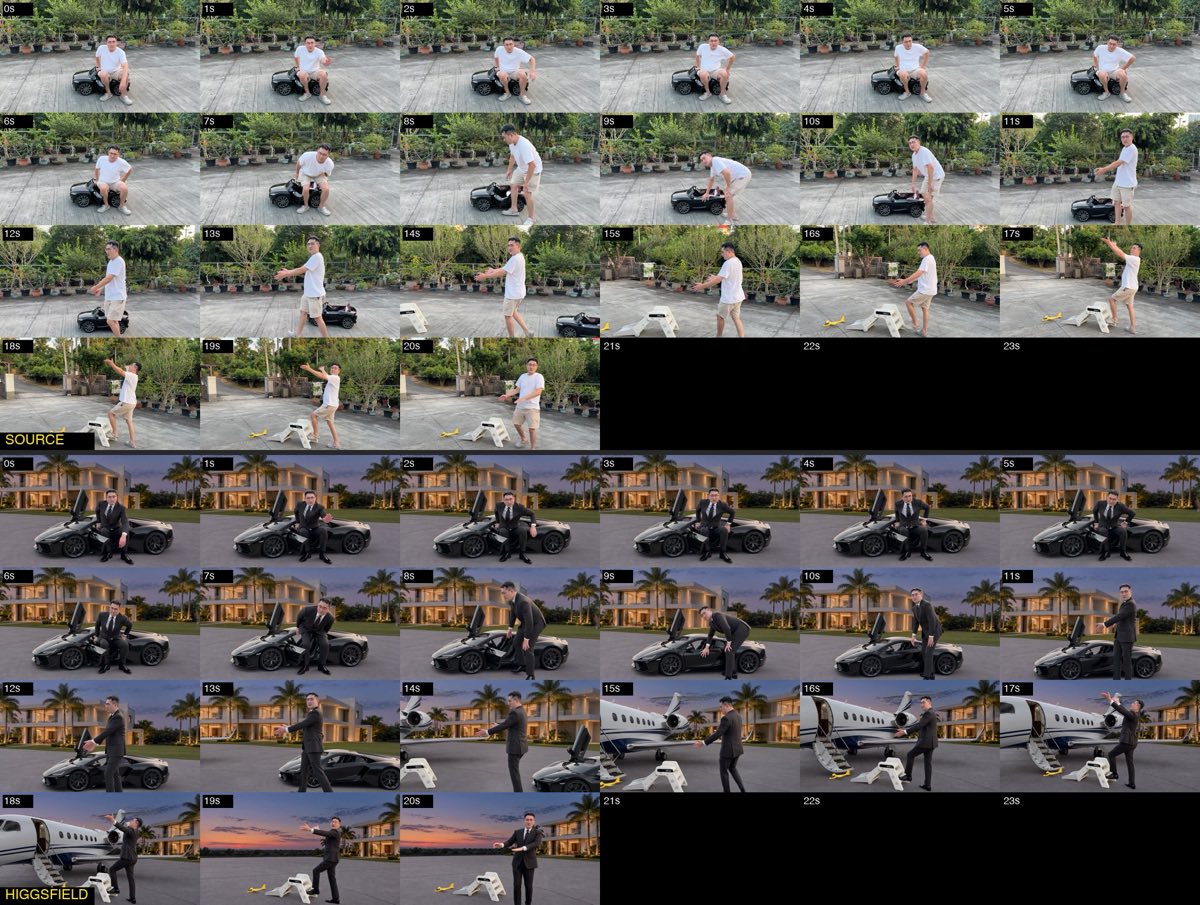
第一次生成的逐秒對照圖:上半原片坐在玩具車上,下半 AI 版把玩具車換成跑車,但跑車車頂只到坐著的人腰部,比例偏小
上半是原片、下半是 AI 版,一格一秒。車頂只到我的腰,飛機也小一號。Object Swap 會把新物件塞進舊物件原本的大小,玩具多大,換上去的車就差不多多大。
解法

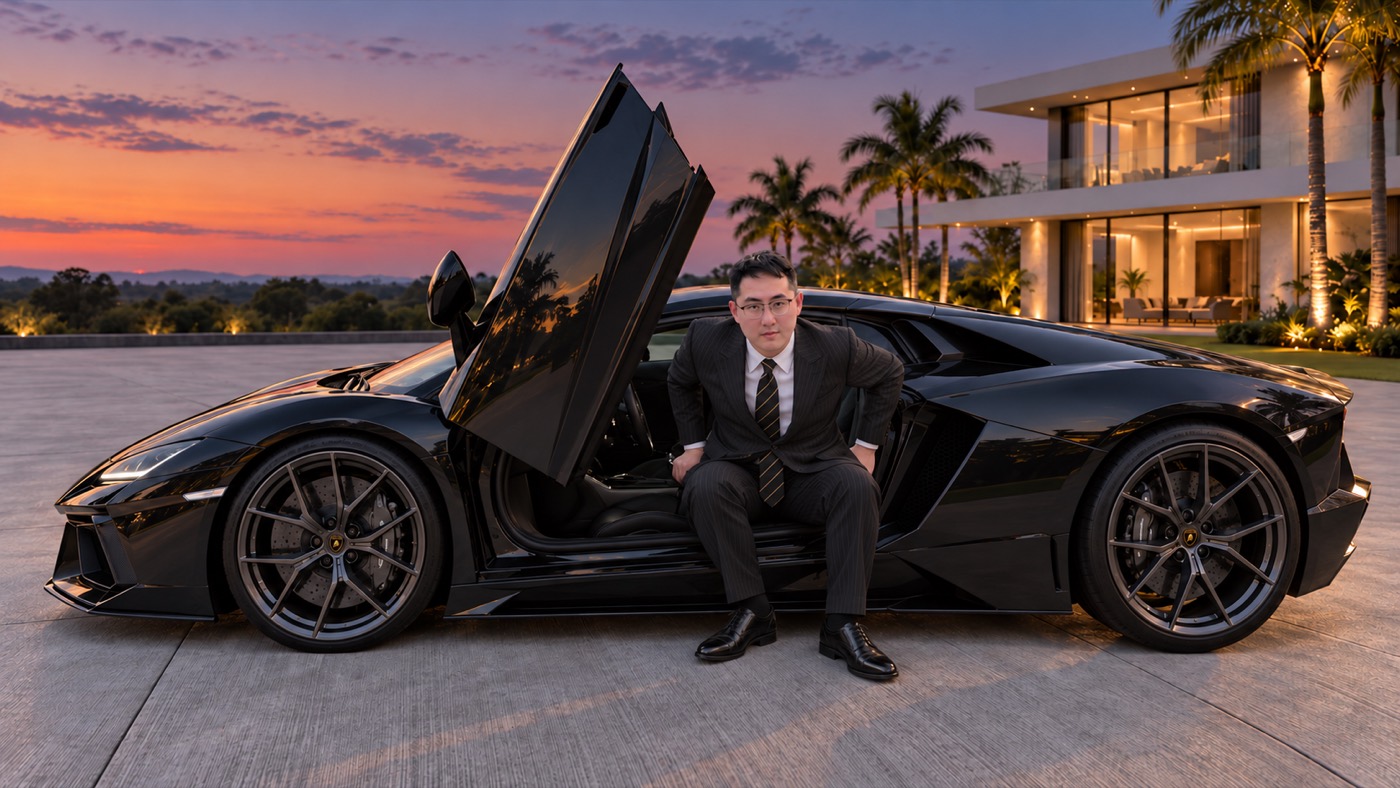
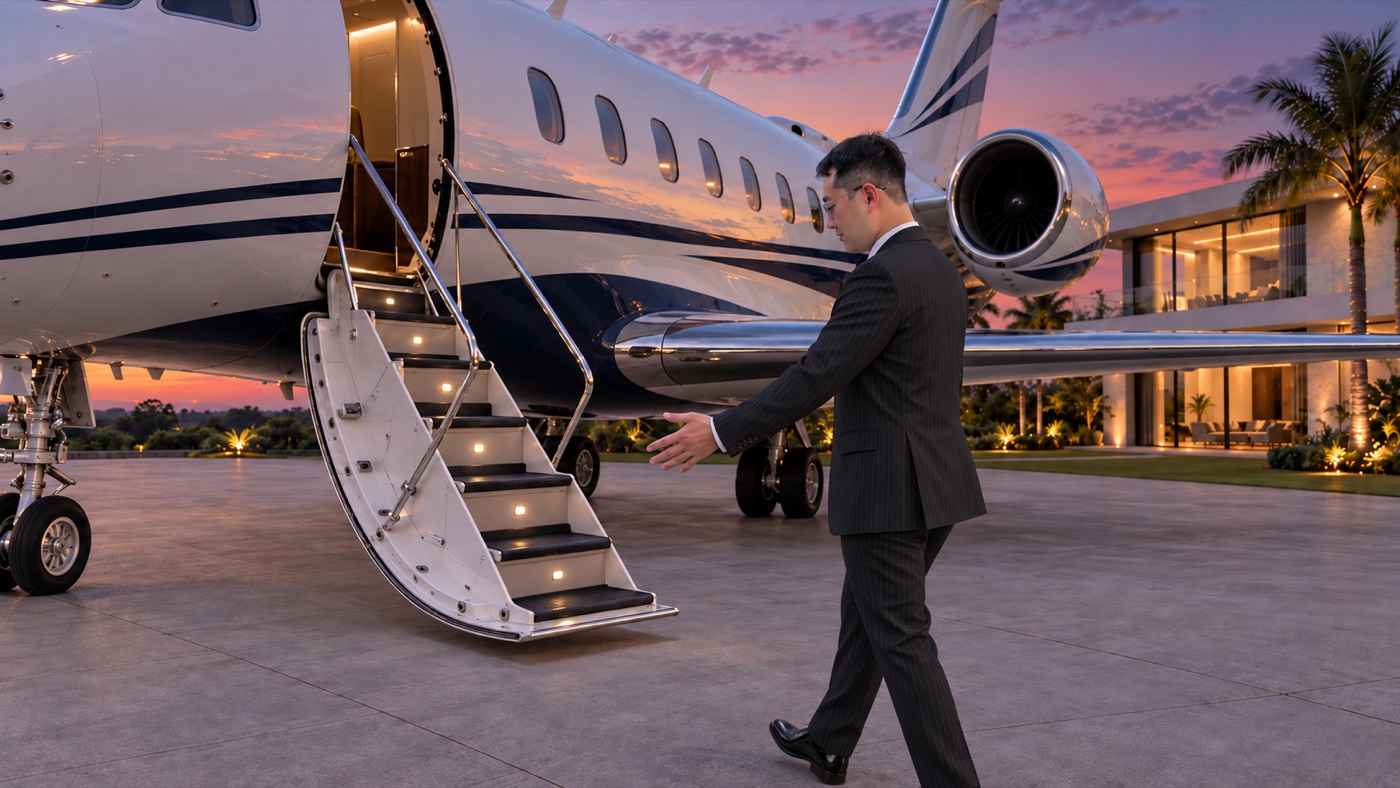
用 ChatGPT 生「人和物放在一起」的定稿圖

ChatGPT 生成的定稿參考圖:穿西裝的人坐在黑色超跑打開的剪刀門邊,車身比例是真實大小
ChatGPT 生成的定稿參考圖:穿西裝的人站在私人飛機放下的登機梯旁,飛機是真實大小

截一格原片丟給 ChatGPT,請它把玩具換成真實尺寸的車和飛機、換上西裝。有了人當比例尺,Genjutsu 換出來的大小就對了。

成功的一版

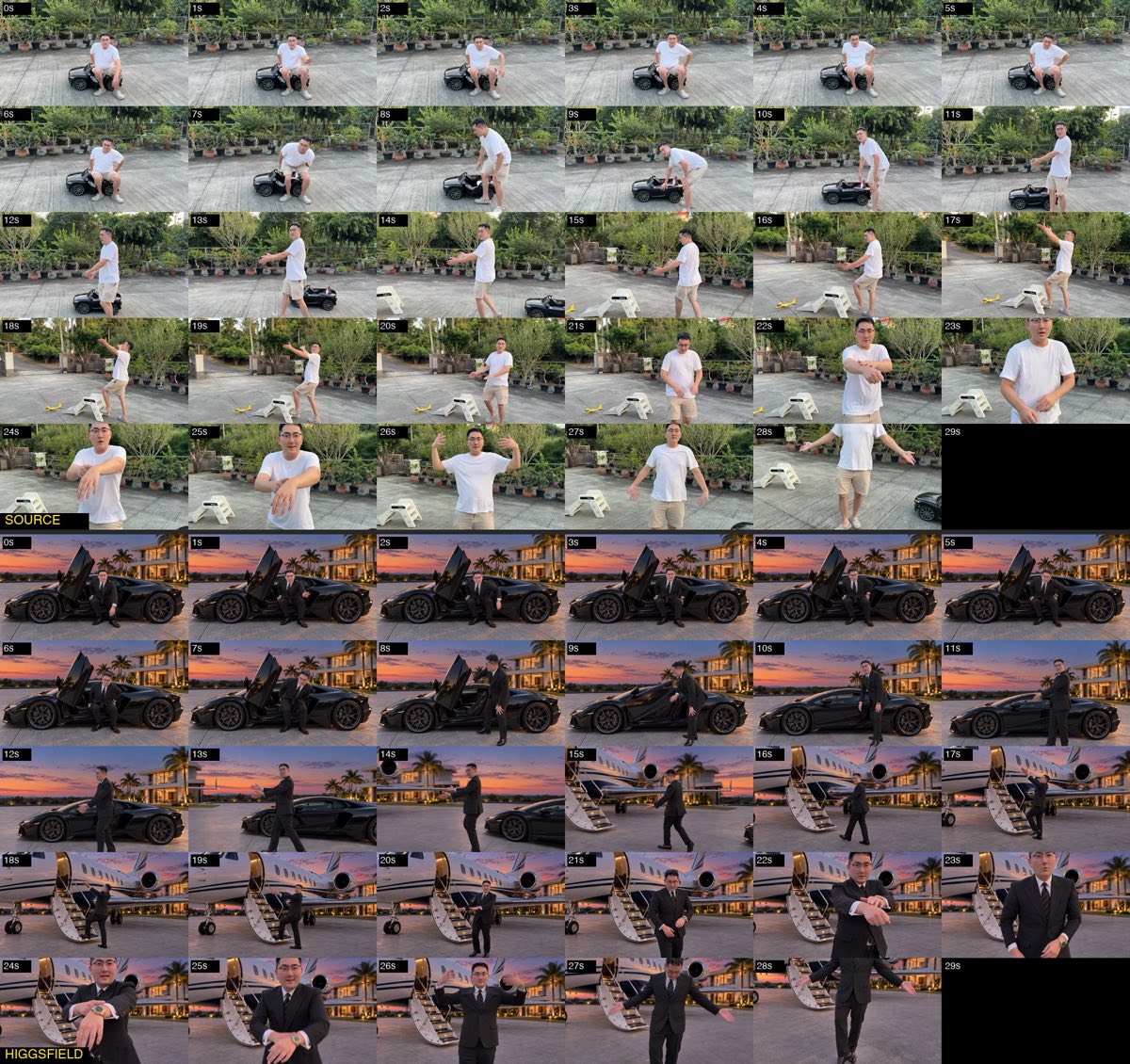
逐秒對照:上原片、下 AI

最後成功版本的逐秒對照圖,0 到 28 秒:上半原片在水泥地上坐玩具車、走向踏凳,下半 AI 版在黃昏豪宅前坐超跑、走到私人飛機登機梯旁
0 到 14 秒是車,14 秒之後換成飛機,衣服、鞋子、背景和兩隻錶整段都在。我的每個動作都照原片,時間也對得上。
踩坑

提示詞裡描述鏡頭,人被畫出畫面

12 到 14 秒每 0.25 秒一格的對照:原片裡人一直在畫面中,AI 版在 13.25 到 13.75 秒鏡頭甩走、人不見了
有一版我在提示詞裡寫了很多鏡頭怎麼甩的描述,結果甩鏡那段它自己改了運鏡,13 秒多的時候人被甩出畫面。鏡頭交給原片就好,提示詞別描述鏡頭怎麼動。
踩坑

兩隻錶放同一次,被揉成一隻

手腕特寫:應該左手綠面鋼錶、右手玫瑰金錶,生成出來的錶變成玫瑰金錶殼配綠色錶面的混合款
我要的是左手綠面鋼錶、右手玫瑰金錶,兩張參考圖放在同一次,出來的錶變成玫瑰金錶殼配綠色錶面的混合款。

做完的心得

2026-09-29 一天的紀錄

9 次
總生成次數
8 次
480p 測試
1 次
1080p
1

參考圖裡的比例,比提示詞寫尺寸有用

我一開始在提示詞裡用文字寫比例,像是坐著時車頂到頭頂、車身是我身高的幾倍長,效果有限。直接給一張「人和車放在一起」的圖,它就知道要多大。

2

提示詞越短越穩

一個玩具換一個東西、一句話。最後成功那份大約 1,400 字元;我寫到 3,000 字、連鏡頭怎麼甩都描述進去的那版,反而讓它去改運鏡。

3

兩張同類的參考圖幾乎一定混

兩隻錶放同一次,很容易揉成一隻,Timur 自己也說四次有三次會混。要嘛只放一隻,要嘛接受要多試幾次。

4

一定先 480p

我 29 秒的影片,480p 一次 87 點,1080p 一次 319 點(Plus 方案折扣後),差了三倍多。480p 就看得出比例、位置和手腕對不對。

5

同一份提示詞,每次結果都不一樣

有時候玩具會被換掉,有時候不會。每次出來都逐格看過再決定要不要改,別一次改好幾個地方。

6

原片的聲音可以直接鋪回去

生成結果每一格都是重畫的,但時間軸照原片,嘴型和動作都對得上,所以原片的聲音直接放回去就好。

英文提示詞

點右上角「複製」,把物件、時間和編號換成你自己的

Timur 的範本:每一行換一樣東西,最後一行照抄

TASK - VIDEO EDIT: [start]-[end]s: Replace only [thing in the video] with [thing] from @ImageN, [where and how]. [start]-[end]s: Add only [thing] from @ImageN [where], [anchored to an action]. Keep every unrequested element, camera motion, lighting treatment and overall color grading from @Video1 exactly the same.

Timur 的定稿提示詞:私人飛機+紅色跑車那支,換背景、衣服、兩隻錶、車、飛機、鈔票

參考圖順序:1 西裝、2 紅色跑車、3 私人飛機、4 綠面鋼錶、5 玫瑰金錶、6 同一隻玫瑰金錶戴在手上、7 一疊鈔票、8 機場停機坪。取自他公開的教學文件。

TASK - VIDEO EDIT: 0-28.9s: Replace only the forest, trees, shrubs, wooden fence, bark-mulch ground and tree stumps in @Video1 with the private airfield location from @Image8: one flat concrete apron under his feet extending to the bottom of the frame, low distant tree line, open sky. Keep the video's own soft light and shadow softness; his shadow falls on the concrete. 0-28.9s: Replace only the black printed T-shirt and black trousers worn by the young man with the dark pinstripe suit, white shirt, patterned tie and pocket square from @Image1. 0-28.9s: Add only the silver steel bracelet watch with green dial from @Image4 on his LEFT wrist. Add only the rose-gold octagonal chronograph with black dial and brown leather strap from @Image5 and @Image6 on his RIGHT wrist, worn as in @Image6. Two completely different watches, never mixed, both sharp in every close-up. 0-6.7s: Replace only the small white toy car with the full-size red sports car from @Image2 parked on the apron, driver's door open toward camera. Real scale: the roof reaches the top of his head while he is seated, the car is about three times his height in length. He sits in the open doorway in his original pose, feet on the concrete. The toy occupies only the car's front door area; the rest of the body extends screen right behind him. 6.7-9.6s: As he stands and the camera pans left, the red car leaves frame to the right. 9.7-12.6s: Replace only the wooden staircase and treehouse with the private jet from @Image3 parked on the same concrete, screen left. Its lowered boarding stairs stand exactly where the wooden staircase stood, at the same distance from camera. The fuselage is far larger than the car: it rises above the top of the frame and the nose extends out of frame left. Its wheels rest on the same apron as his feet. He is gesturing at the jet. 18.7-23.8s: When he walks back and bends down, he leans in through the open door of the red car from @Image2, parked exactly where it was at the start, same size. 23.8-28.9s: Replace only the wooden tissue box in his hand with the tall thick stack of used banknotes bound with rubber bands from @Image7, slightly larger than the box, gripped the same way and raised to his ear. Keep every unrequested element, camera motion, lighting treatment and overall color grading from @Video1 exactly the same. No legible text or logos.

我最後成功的那份:玩具車換超跑、玩具飛機換私人飛機、踏凳換登機梯

參考圖順序:1 西裝、2 皮鞋、3 豪宅背景、4 人坐在超跑旁的定稿圖、5 人站在飛機旁的定稿圖、6 綠面鋼錶、7 玫瑰金錶。1,429 字元,2026-09-29 用 Object Swap 以 480p 跑出上面「成功的一版」。

TASK - VIDEO EDIT: 0-29s: Replace only the white T-shirt and beige shorts worn by the man in @Video1 with the charcoal pinstripe suit, white shirt and gold-striped black tie from @Image1. 0-29s: Replace only the white sneakers with the black leather dress shoes from @Image2. 0-29s: Replace only the potted plants, metal fence, trees and grey wall behind him with the white modern mansion, lawn, palm trees and dusk sky from @Image3. The concrete ground stays as it is. 0-29s: Add only the silver steel bracelet watch with green dial from @Image6 on his LEFT wrist. This is the only watch on his left wrist. 0-29s: Add only the rose-gold chronograph with brown dial and brown leather strap from @Image7 on his RIGHT wrist, worn as in @Image7. This is the only watch on his right wrist. The two watches are completely different; never mix their features. 0-14s: Replace only the small black toy car with the full-size black supercar from @Image4, at the real size shown in @Image4 relative to the man. 14-29s: Replace only the small yellow toy plane with the full-size private jet from @Image5, at the real size shown in @Image5 relative to the man. 14-29s: Replace only the white step stool with the jet's lowered airstair from @Image5; his foot steps on its first step. Keep every unrequested element, camera motion, lighting treatment and overall color grading from @Video1 exactly the same. No legible text or logos.

我生定稿參考圖用的提示詞(ChatGPT):第一張放原片截圖,第二張放車、第三張放背景、第四張放車門打開的樣子

黃字的身高和車子尺寸換成你自己的。這是車那張;飛機那張用同樣的寫法,把車換成飛機和登機梯。衣服是另外再下一段提示詞,把這張圖裡的 T 恤短褲換成西裝。

Edit the FIRST image (a frame from my video). Keep the man exactly as he is: same face, same pose, same position and same size in the frame, same camera angle and lens. Do not move or resize him. Replace the small black toy car he is sitting on with a FULL-SIZE black supercar like the one in image 2, rendered at true real-world scale relative to the man (the man is 175 cm tall; the car is about 4.5 m long, 1.15 m to the roof, wheels about 68 cm). He sits on the sill of the open driver door with his hips at sill height; the scissor door is raised open the way it is in image 4. The car body extends far to the right of him and behind him; the roof line is above his head while he sits. Replace the potted plants, metal fence and trees behind him with the private estate from image 3: white modern mansion, lawn and palm trees in the middle distance, dusk sky, no sun disc. Keep the existing concrete ground and his shadow on it. Photorealistic, 16:9, cinematic dusk lighting, no text, no logos.
常見問題

Higgsfield Genjutsu 一次要花多少點數?

我 2026-09-29 做的是一支 29 秒的影片,480p 一次 87 點,1080p 一次 319 點(Plus 方案折扣後)。Timur 的 27 秒影片是 480p 84 點、1080p 252 點。點數依影片長度和方案不同,以 Higgsfield 當下顯示的為準。

為什麼放兩隻錶的參考圖會混在一起?

同一次生成放兩張同類物件的參考圖,模型很容易把兩者揉成一個。我放兩隻錶那次,出來變成一隻玫瑰金錶殼配綠色錶面的混合款;Timur 也說四次有三次會混。要穩就一次只放一隻,或把第二隻留到另一次單獨生成。

一定要付費方案嗎?

Genjutsu 生成要扣點數。我這次用的是 Plus 方案,9 次生成的點數都是從方案點數扣的。免費額度和各方案內容會變動,以 Higgsfield 官方價格頁為準。

Claude 或 ChatGPT 在這個流程裡做什麼?

ChatGPT 用來生參考圖。Claude 或 ChatGPT 可以幫你把記下的時間點整理成時間表、寫成英文提示詞。Timur 另外用 Claude 接 Higgsfield MCP 上傳檔案、送出任務和逐格檢查,他說這步只是省點擊,模型不會因此變好。他也提到,同一份提示詞在網站被擋時,從 MCP 送出都有過。

資料來源

說明
點數、方案和介面是 2026 年 9 月的狀態,Higgsfield 隨時會調整,動手前以網站上顯示的為準。影片裡換上去的車、飛機、錶都是 AI 生成的畫面,發到社群時建議標明是 AI 製作。

想聊這個做法

在我 IG 的 Genjutsu 影片底下留言「跑車」,或直接私訊我

@kanisleo328

要引用這頁的話