The free tool gives your AI keyframes and a transcript — enough to know what a video is about.
Pro adds everything else: how it's shot, how it's cut, how it's spoken, what it feels like. All of it computed on your machine, written as plain text any LLM can read.
What Pro adds
Camera & pacing --motion
Every shot auto-labelled: static, pan, tilt, zoom, handheld. A full shot table: per-shot duration, cuts per minute, how pacing shifts across open, middle and close. High-motion shots get 0.2s-apart burst frames, so movement reads as a progression instead of a guess.
Sound & emotion --senses
Voice emotion, vocal tone curves, and audio events (laughter, SFX, ambience) marked segment by segment. Vocals and music are auto-separated: emotion reads the clean voice, the music gets its own BPM and energy track. For MVs and film footage with no dialogue, it switches to reading mood from color and light.
Interactive viewer --viewer
Every analysis ships with a web page — double-click to open: the video, a clickable event timeline that jumps to the second, and a transcript that highlights along with playback. Interface in English, Traditional and Simplified Chinese. Zero install, zero upload.
Two reports, one flag --ai-report
Using your own API key, it writes two reports on the spot: one on how the video is shot, one on what it says.
On-screen text --ocr new
Captions, title cards and signs in the video become timestamped, quotable, searchable text. Names, numbers and terms the speech-to-text mishears get corrected on the spot by the video's own captions. Short-form video is wall-to-wall text cards — now every one of them is data. Especially strong on Chinese, Japanese and Korean, and it all runs on your machine.
Memory across your library crv-pro-ask new
Everything Pro has ever watched becomes one searchable, local index. Ask in plain words — which video said it, which second, the exact line, any language. Then ask what only Pro can answer: --camera zoom finds every zoom you've ever watched, --track emotion finds the moments the voice model flagged, --rhythm ranks your whole library by cuts per minute. Re-running a video you've already watched takes 0.04s instead of minutes — it just points at the existing analysis. One SQLite file on your machine, nothing uploaded.
Speed forensics --speed-check new
Detects tampering with the video's timeline, segment by segment. Multi-channel evidence — frame-padding fingerprints, motion-trajectory continuity, a person-anchored speed clock — flags padded slow-motion, post speed-ups and interval capture per segment, with evidence tiers. Honest by design: it reports evidence, never claims "normal speed", and a fusion rule keeps fast sports and game footage from being falsely accused. Validated in three human-blind test rounds before shipping.
Recent updates
0.10.7 · A caption 429 no longer fails the download
Platforms rate-limit caption endpoints far harder than media. A 429 there used to abort the whole run and Whisper never got a file. crv now retries without the caption request first, so the video still arrives and Whisper takes over. Community fix (#29, @Kikobazz123).
0.10.5 · Apple Silicon GPU transcription
Install the [mlx] extra and Whisper runs on the Mac's GPU: a 21-minute talk that takes about 6 minutes on faster-whisper finishes in about a minute on an M4, same transcript. The voice-activity gate still runs first, so music or silence never becomes invented captions.
0.10.1 · Time windows --from --to
Analyse only part of a long video: ffmpeg seeks straight to the start point, the transcript and frame budget follow the window, and every reported timestamp stays a source timecode. Fixed and hardened in 0.10.1. The 0.10.x line also adds --frame-width — raise the frame width when the meaning is small text (terminals, spreadsheets, dense dashboards).
See the actual interface
Real output
It all lands in the same MANIFEST.txt your LLM already reads — as plain text:
--- motion analysis (crv Pro) ---
editing rhythm: 14 shots | 21.0 cuts/min | avg 2.8s (median 2.1s, range 0.8-9.4s)
cuts by thirds (open/middle/close): 7 / 4 / 3
shots:
  #01  0.00-2.10s  (2.10s) camera: pan-right   motion: high (12.3%W/s) burst: burst_shot01_1..4
  #02  2.10-4.80s  (2.70s) camera: zoom-in     motion: medium (3.1%W/s)
  #03  4.80-9.20s  (4.40s) camera: static      motion: low (0.2%W/s)
  ...
What users say
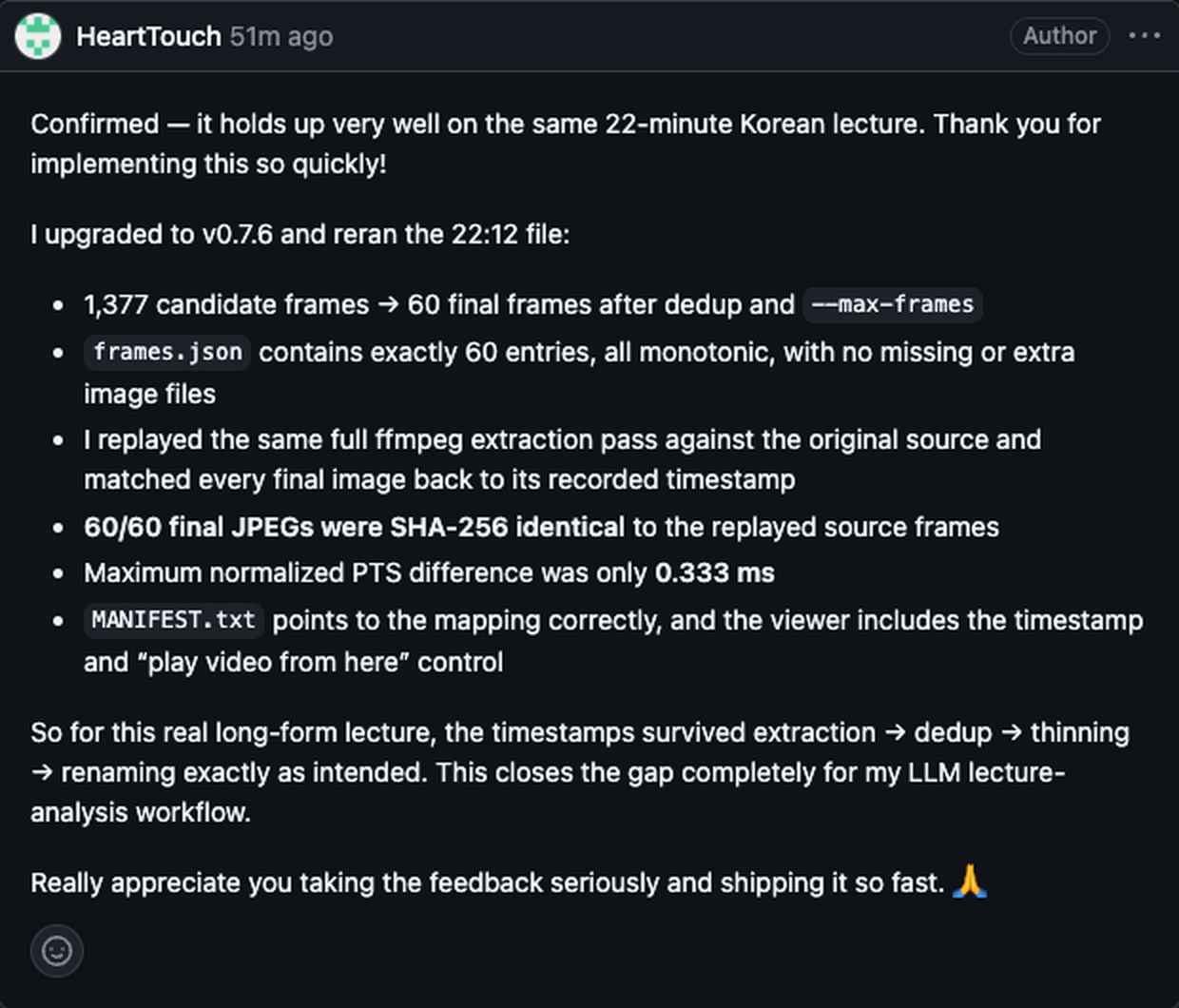
A user re-verified our frame timestamps with his own SHA-256 replay test — on a real 22-minute lecture. Public comment on GitHub issue #7:
Who it's for
Common questions
Real questions from Reddit threads and buyer emails, answered with real numbers.
Will this eat my tokens?
No — the heavy lifting never touches the AI. All the video processing runs free on your computer; tokens are only spent when your AI reads the small result. A one-minute video boils down to a handful of images and a text file — with contact sheets, reading a whole clip costs a fraction of what you'd expect. A typical read is a few cents' worth, or simply part of the Claude/ChatGPT subscription you already pay for. Prefer zero API cost? The output is plain frames and text, so an open-weight model such as Kimi K3 or Qwen-VL can do the reading on your own hardware.
Does my video get uploaded anywhere?
No. Everything runs on your own machine — the video, the frames, the transcript, the analysis. Nothing is sent to any server. The only thing that ever leaves your computer is whatever you yourself choose to paste into your AI afterwards. Client footage and unreleased cuts stay home.
Do I need a powerful computer?
A normal laptop is fine — no graphics card needed. On a Mac mini, a one-minute clip with every analysis switched on finishes in under two minutes; lighter runs are much faster. Works on macOS, Windows and Linux.
I'm not a programmer. Can I use this?
Yes. After a one-line install, run crv-web and a local page opens in your browser: paste a video link, click Analyze, open the result. Or install it as a Claude Code skill and just paste a video link into the chat — the AI handles the rest.
Isn't Google's AI already doing this?
Gemini can take videos, and it's genuinely good. Three differences: your video gets uploaded to Google's servers (here it never leaves your machine); Gemini samples frames on a fixed clock while crv keeps only the moments the picture actually changes; and Gemini only works inside Gemini — crv makes video readable for every AI, including Claude and ChatGPT, which don't accept video files at all.
How long does a video take to analyze?
Quick reads (frames + transcript) on a short clip: about a minute. Every analysis switched on: from about 2× the video's length up to ~5× for event-dense footage — a one-minute reel takes about two minutes, while a busy two-minute promo with everything on ran nine. Passes are modular, so you only wait for what you switch on.
Can I use it for my business?
Yes. The engine and every bundled model use commercial-friendly licenses (Apache-2.0 / MIT), checked before every release. One license covers all your machines.
How it works
Camera & pacing analysis runs on ffmpeg + OpenCV with no models to download; the sound & emotion models download once on first use, then run offline. Transcription uses Whisper turbo (a pruned large-v3 — much faster than large, with a minor quality trade-off). Everything is processed on your machine and the source video never gets uploaded; only what you later choose to paste into a cloud LLM goes to that provider. After purchase you get the install package and your license key; one license, use it on all your machines. Since 0.8.0 the free base also ships an MCP server (crv-mcp), so Claude Code, Claude Desktop and Cursor can request a video directly; Pro's deeper passes run on the same cached analysis from the CLI.