Build a site with a backend and a database from 0
Advanced version · a real guestbook build · Next.js + Supabase + environment variables

黃志弘 Leo
Published 2026-06-26 · Updated 2026-10-07 · 2 readers
A guestbook that really saves what visitors write
Three new things this time: a backend API, a database, environment variables
The page in the basic guide is dead. Once it is built it sits there and visitors can only look. The page here is alive. Visitors can send data in, it gets stored, and it is still there next time. Three things make that difference:
| Capability | Basic guide (static) | This page (with a backend) |
|---|---|---|
| Show text and images | ✓ | ✓ |
| Visitors send data in | ✕ not possible | ✓ comment form |
| Store the data | ✕ no database | ✓ saved into Supabase |
| Keep keys safe | not needed | ✓ environment variables |
Sign up for Supabase and create your first project
Claude Code, GitHub and Vercel carry over from the basic guide. There is only one new account here, Supabase (your cloud database).
0-1Create a Supabase account
- Go to supabase.com, then click the top-right Start your project
- Choose Continue with GitHub (same as the Vercel sign-up, just authorize it)
- Once inside, click New project (or go straight to database.new), give it a name (say
my-guestbook), set a database password (generate a random one and save it, this page barely uses it), and pick a region near you (Singapore, say) - Wait a minute or two and the project is ready
claude ☐ you can log in to GitHub ☐ you can log in to Vercel ☐ you can open Supabase and see the project you just made. All four ticked, keep going.11 prompts: talk a data-saving web page into existence with Claude
Same as the basic guide. Paste each prompt into Claude Code in order, press Enter when it finishes, then paste the next one. Every prompt has a copy button in its top right. First, in Terminal, move into the folder where your projects live (say cd ~/Projects) and type claude.
Step 1Create the guestbook project with Next.js (1 prompt)
Create a Next.js project called my-guestbook. I want a visitor guestbook: a comment form, and after you submit, the comment is saved and shown below. For now just get the project created and running on my machine.create-next-app to create the project and install the packages, and you get a line saying Success! Created my-guestbook. It then tells you to run npm run dev and open localhost:3000. The screen is still the default Next.js page at this point, which is normal.npx: command not found, Node.js is not installed yet. Ask Claude to install Node.js, then paste Prompt 1 again.Step 2Connect Supabase and create a table for comments (2 prompts)
Install the official Supabase package @supabase/supabase-js. I am going to use it to save comments into the database.npm install @supabase/supabase-js, the official Supabase client, and the terminal prints something like added 8 packages (the number changes between versions; seeing "added" means it worked).My Supabase needs a table called guestbook for comments, with columns for name, message and created time. Give me the SQL so I can paste and run it in the Supabase SQL Editor. Turn on RLS (Row Level Security), add policies for "anyone can read, anyone can insert", and explicitly grant read and insert to the anon role.create table guestbook (
id bigint generated always as identity primary key,
name text not null,
message text not null,
created_at timestamptz not null default now()
);
grant select, insert on public.guestbook to anon;
alter table guestbook enable row level security;
create policy "anyone can read" on guestbook
for select to anon using (true);
create policy "anyone can insert" on guestbook
for insert to anon with check (true);42501 or permission denied for table guestbook, the grant is missing; paste the error into Claude and it will add it.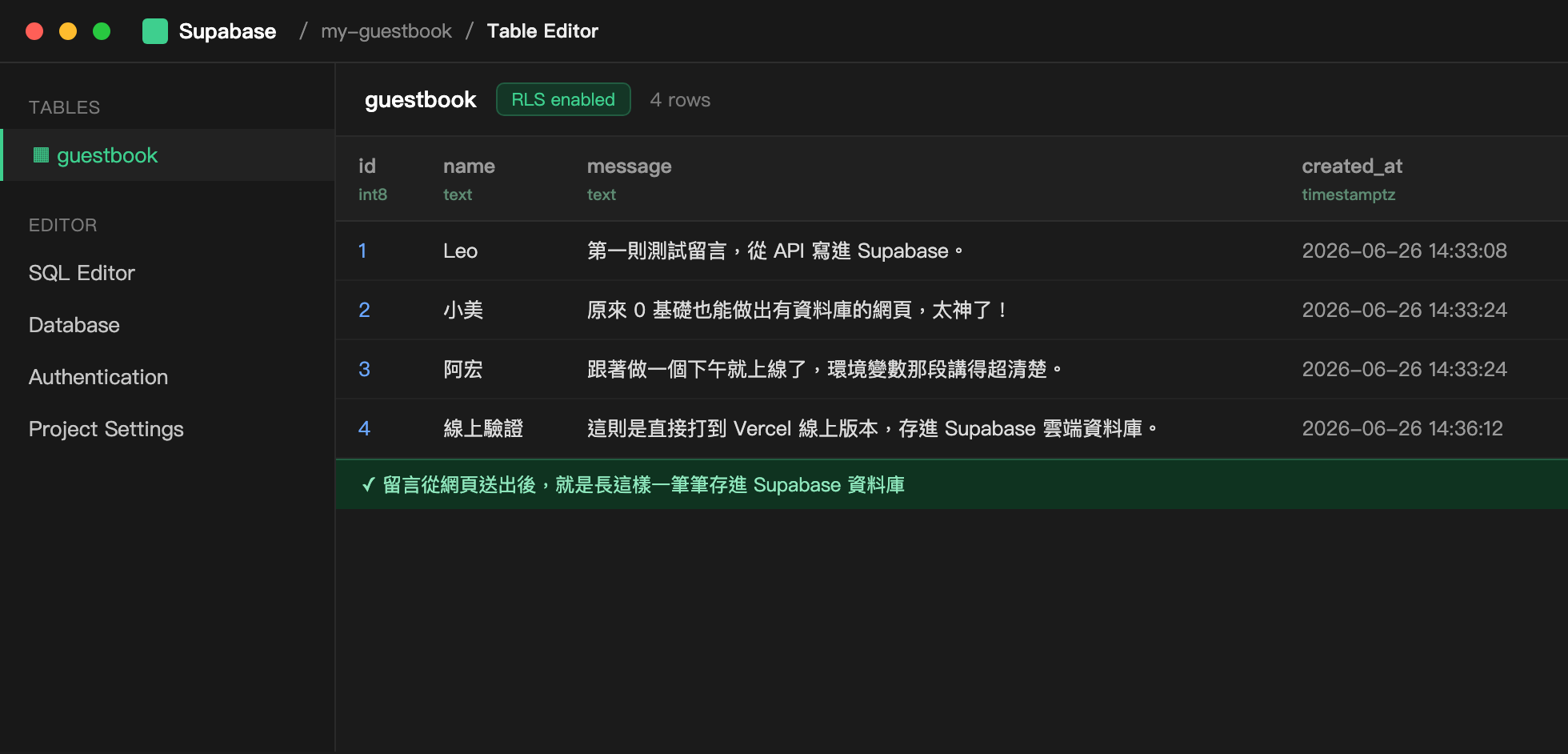
guestbook table, and this is real data from my own run.Step 3Get the Project URL and publishable key into .env.local (2 prompts)
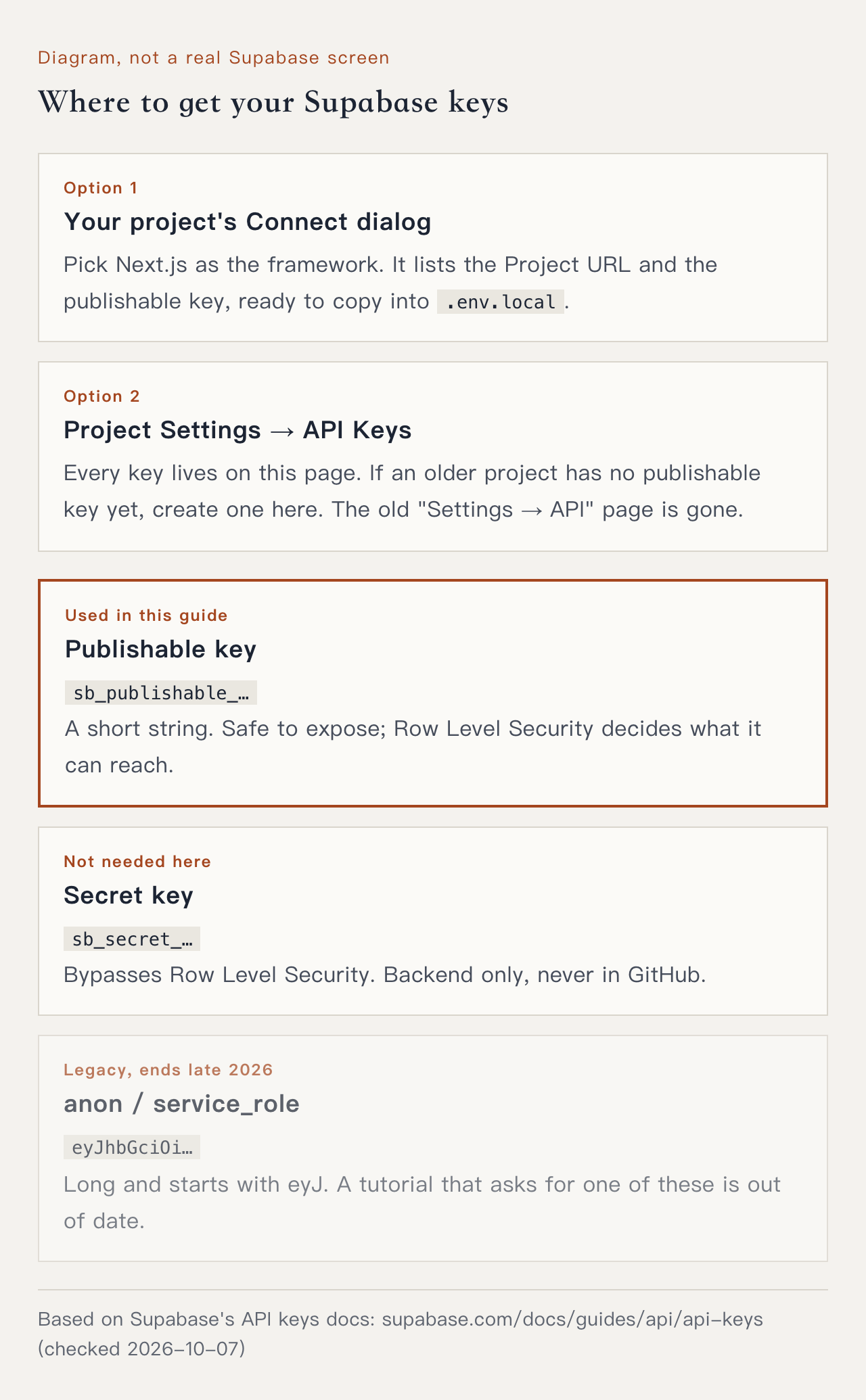
anon and service_role keys are being retired by the end of 2026, replaced by the publishable key (starting with sb_publishable_) and the secret key (starting with sb_secret_). The new keys are short strings. If a tutorial asks you to copy a long key starting with eyJ, it was written for the old keys; this page uses the key that starts with sb_publishable_.Copy these two values from Supabase
Open your Supabase project. Either of these places has them, pick one:
- Your project's Connect dialog: choose Next.js as the framework and it lists the Project URL and the publishable key, ready to copy.
- Project Settings → API Keys: every key lives on this page, and the Project URL also shows in the Connect dialog. If a tutorial points you to "Settings → API", that page is gone; look on API Keys instead.
Create a .env.local file in the project root with two environment variables, SUPABASE_URL and SUPABASE_PUBLISHABLE_KEY. Use placeholder values for now, I will paste the real ones in myself. Also confirm .gitignore excludes .env.local so it never gets pushed to GitHub..env.local and confirms .gitignore contains .env* (Next.js has it by default, so your keys are excluded from the start). To check yourself, type git check-ignore -v .env.local in the terminal. If it prints .env.local, the file is excluded: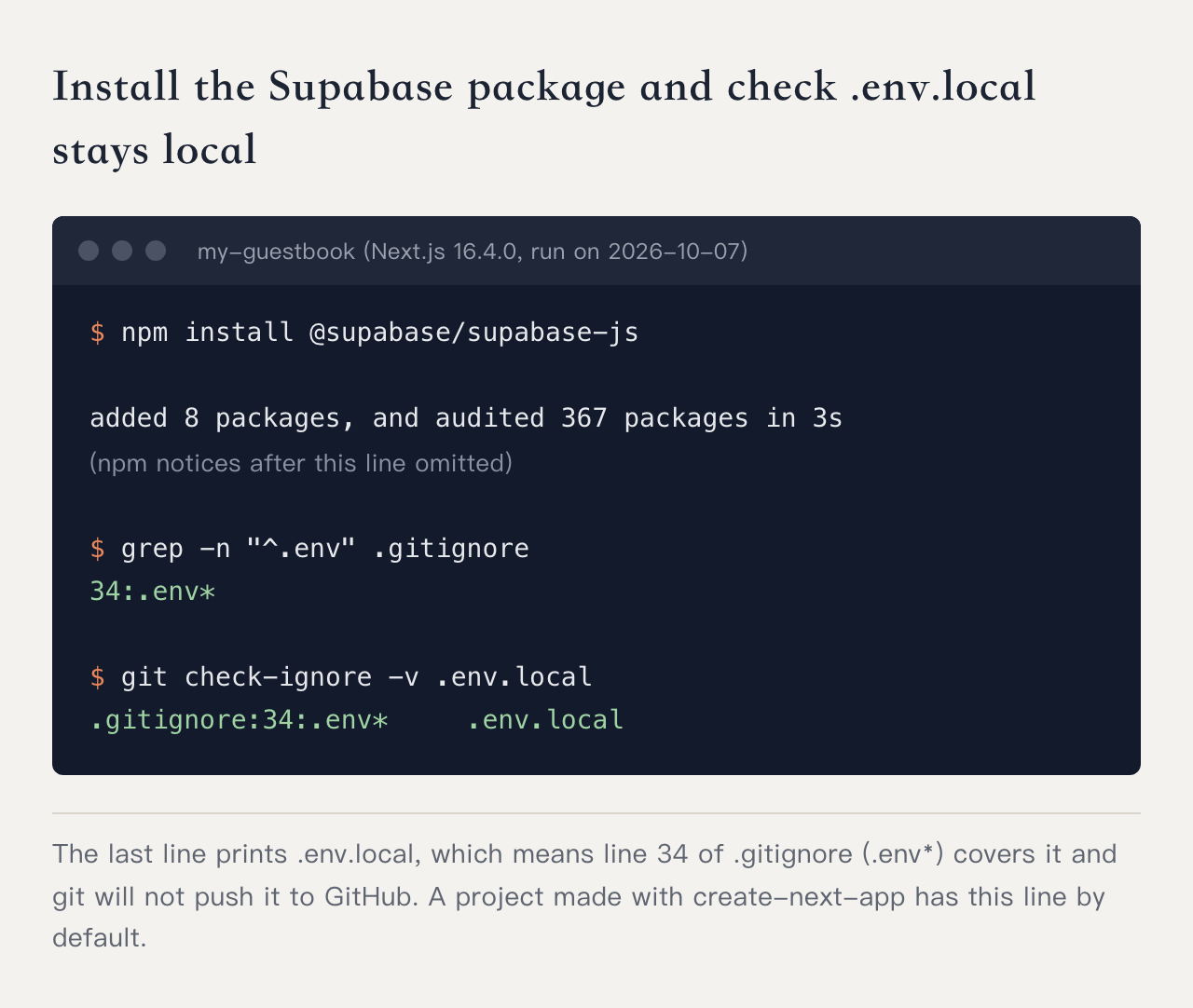
.env.local, so git will not push it to GitHub.Then you paste in the two values you just copied, so .env.local looks like this:
SUPABASE_URL=https://your-project-ref.supabase.co
SUPABASE_PUBLISHABLE_KEY=sb_publishable_...(the string you copied)NEXT_PUBLIC_. This page only reads the key inside the backend API, so it has no prefix, and Next.js will not bundle it into the page..env.local, confirmed excluded by .gitignore, and the code only reads them through names like process.env.SUPABASE_URL. Before you paste, you can ask Claude "could my keys end up on GitHub?" and have it check once more.Step 4Have Claude write the backend API and the guestbook screen (2 prompts)
Write me a backend API: one part adds a comment (writing the name and message into the guestbook table in Supabase), one part reads all comments back, newest first. Connect using the environment variables SUPABASE_URL and SUPABASE_PUBLISHABLE_KEY, keep this code server-side only, and never send the key to the browser. Also do a basic length check on the name and the message so they cannot be blank or too long.app/api/guestbook/route.ts), reads the key with process.env, connects to Supabase to insert and query, and rejects blank or overlong input.Build the guestbook screen: a form at the top (name, message, submit button) that calls the API we just wrote, clears the fields and refreshes on success, and below it every comment listed newest first with name, message and time. Keep the style clean and simple, a warm cream background with gold accents, and make it look good on a phone.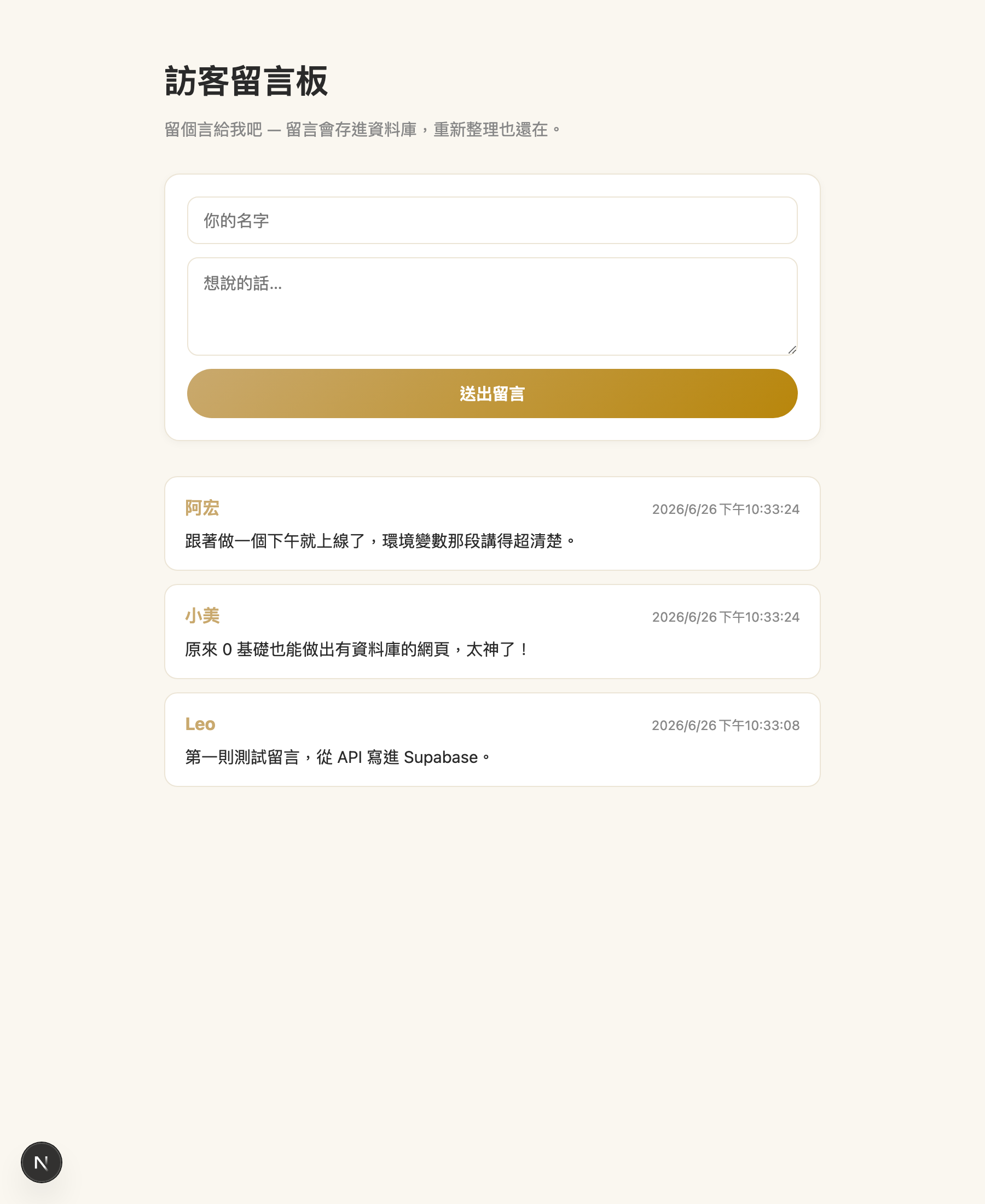
localhost:3000. The form sits on top, the comments below, clean and simple. This is my real screen.Step 5Post a comment locally and confirm it saves (1 prompt)
Start the site on my machine and tell me which address to open. I want to post a test comment, then refresh the page and confirm the comment is still there, which means it really went into the database.guestbook table, where the comment will be sitting. If it disappears on refresh something is not wired up, so screenshot the screen for Claude and say the comment is not being saved.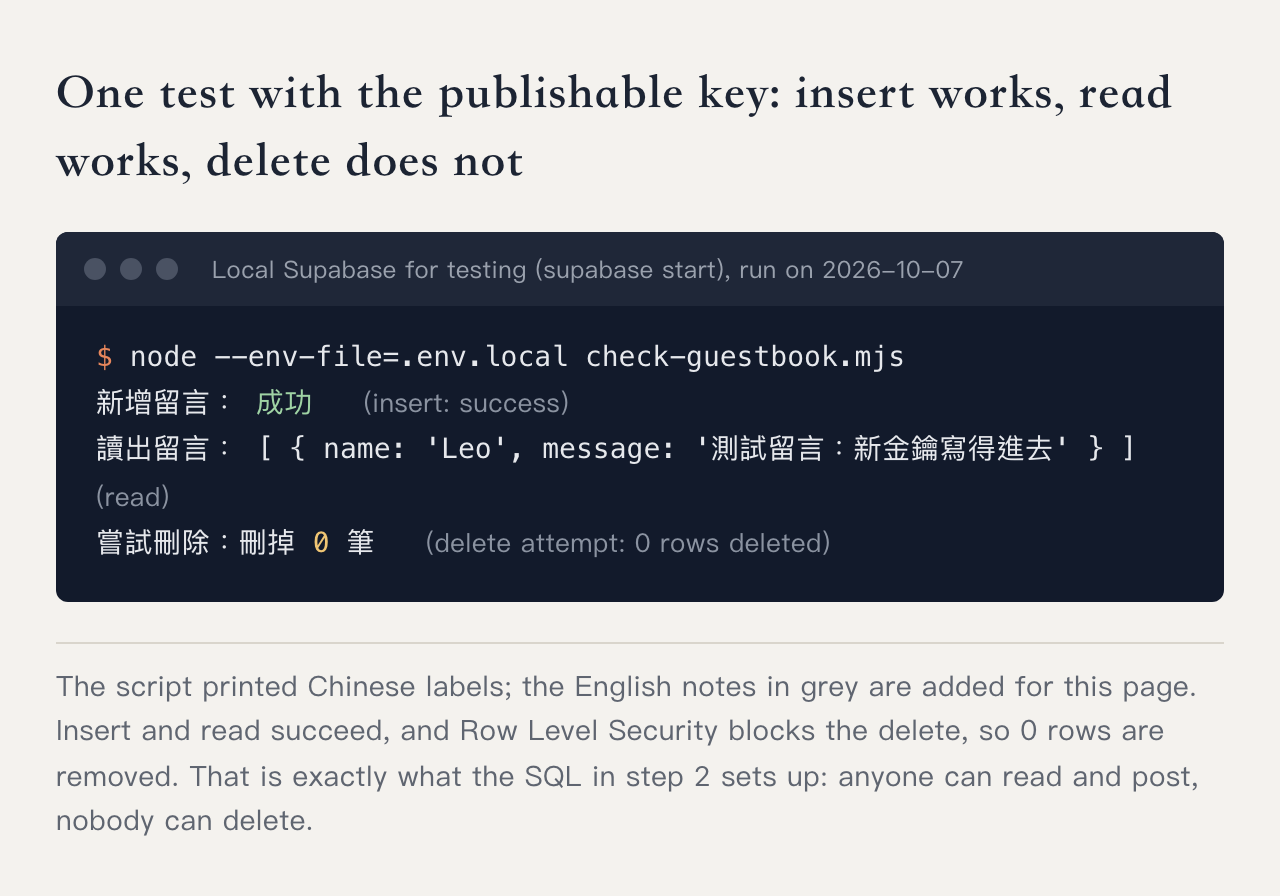
Step 6Push to GitHub, deploy to Vercel, then add the environment variables (3 prompts)
Upload this project to GitHub, name the repo my-guestbook. Before uploading, check one more time that .env.local is not included..env.local is in .gitignore, the keys are not uploaded. Go look on GitHub, and if you cannot find .env.local, it worked.Connect my-guestbook on GitHub to Vercel, deploy it, and give me the URL.xxx.vercel.app address. Opening it now may break, or comments may fail, because the keys were never uploaded and the cloud does not know where your database is. The next step fills that in.Remind me to set the environment variables on Vercel. In the Vercel project I need Settings → Environment Variables with SUPABASE_URL and SUPABASE_PUBLISHABLE_KEY, the same values as my local .env.local, environment set to Production, and a redeploy once they are saved.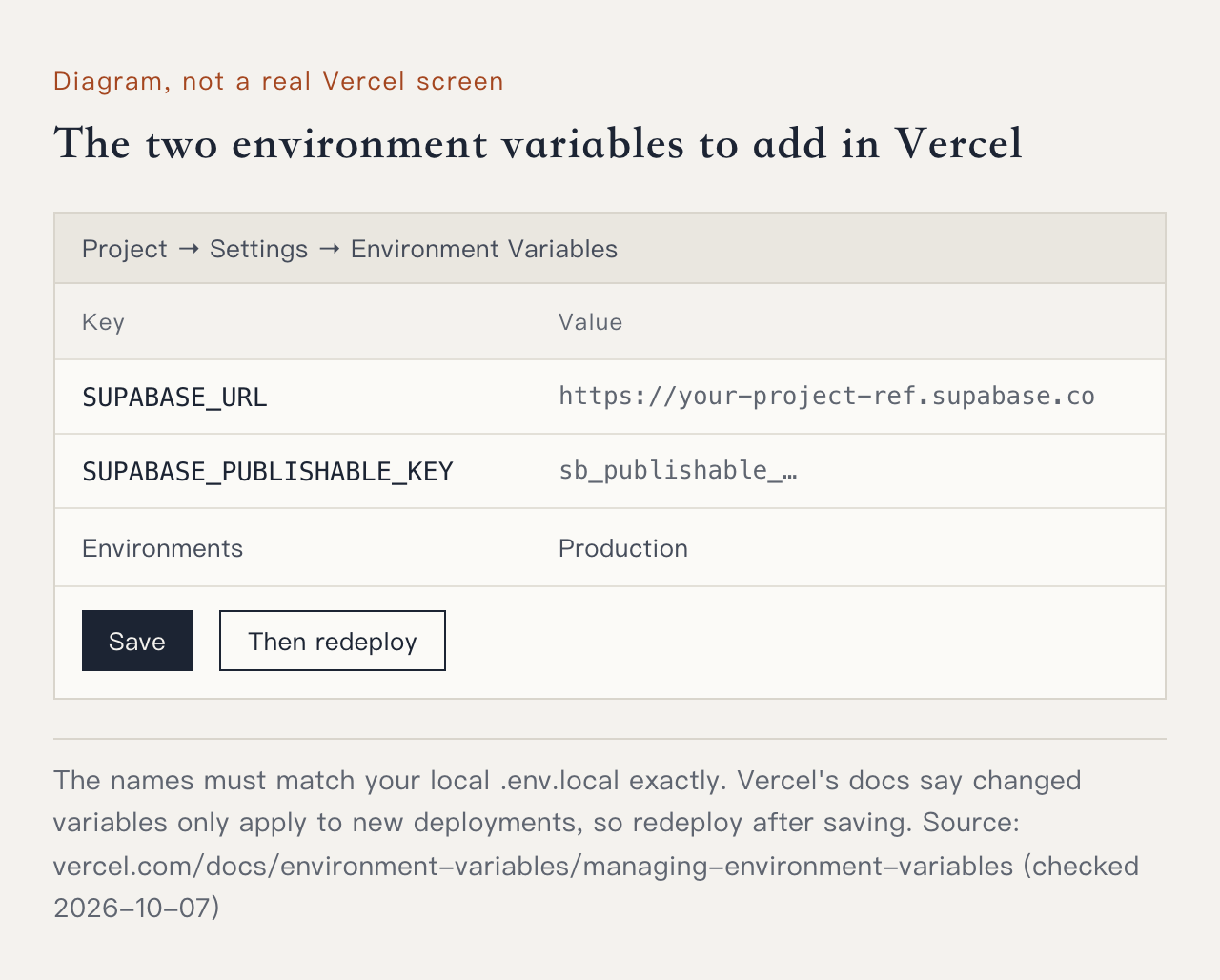
.env.local never gets uploaded, so you paste the values again here in the cloud. The names must match your local file exactly. (Diagram).env.local is deliberately left out of the upload, which is what keeps the keys safe, so Vercel in the cloud never receives it. You have to tell it again in the Vercel dashboard. Vercel's docs also say changed variables only apply to new deployments. So the most common case is works locally, breaks live, and the cause is usually a missing environment variable on Vercel, or a redeploy you forgot after setting them.The environment variables are set, so redeploy, then open the live address. I want to post a comment and confirm the live version really saves it into the database.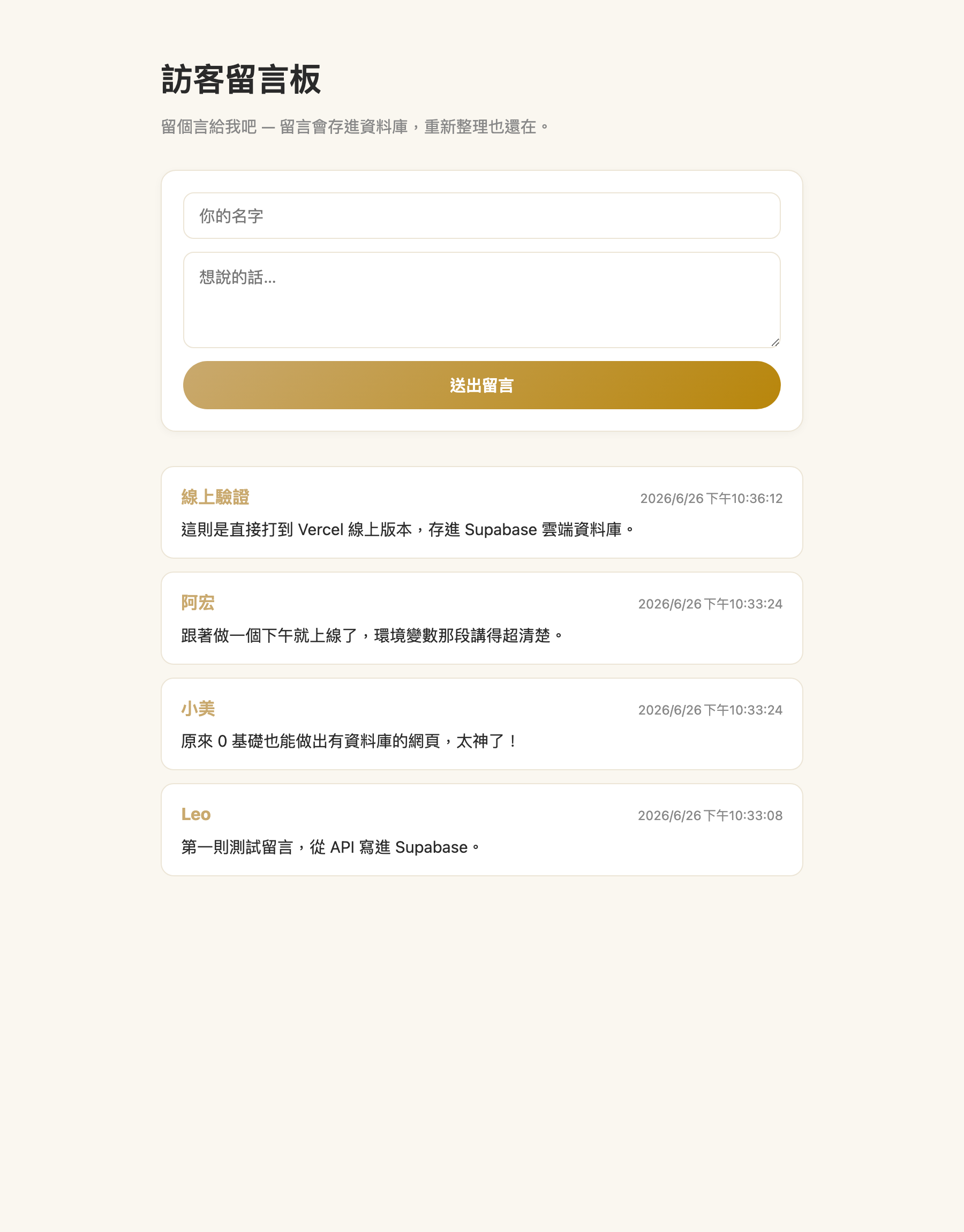
The security traps this page steers you around
Once a page has a backend and a database, security is in play. AI is very good at making things run, and often makes them run without being safe. The approach here bakes in three correct habits for you:
.env.local, excluded by .gitignore, so they never appear on GitHub. The code only reads the names through process.env.service_role in the old system), bypasses every RLS policy. This page does not use it anywhere, and it should never go near the front end.Fixes for "works locally, breaks live" and comments that won't save
With a backend in play, the sticking points differ from the basic guide. These are the common ones:
- Works locally, breaks live: usually the environment variables are missing on Vercel, or you forgot to redeploy after setting them. Go back to Prompt 10 in Step 6.
- Submitting a comment does nothing, or it will not save: read the error first.
permission deniedor42501means the grant is missing. No error but nothing saved usually means RLS is on with no insert policy, which locks the whole table. Paste the error into Claude and ask it to check the grant and the RLS policies. - Invalid API key: check that you pasted the string starting with
sb_publishable_, with no extra spaces, and that the variable is namedSUPABASE_PUBLISHABLE_KEYboth locally and on Vercel. - Red text in Terminal: copy the whole thing into Claude and say "I'm stuck here".
- Not sure whether a key leaked: ask Claude to confirm your keys are not hard-coded in the code and were not pushed to GitHub.
Here is what I am seeing:
[paste the screen / error message here]
It works on my machine, the problem is live / at this step.
Help me work out the fix, step by step.Need a site with a database, an admin panel, or members?
Guestbooks, sign-up forms, membership systems, an admin panel taking orders. Sites with a backend are more involved than a one-pager, and both the spec and the security need checking. Tell me what you have in mind and I will work out the best way to build it.
Free consultation →FAQ
Q: How is this different from the basic guide?
Q: Do I need to know how to code first?
Q: Does Supabase cost money?
Q: I followed an older tutorial and copied the anon key. Does it still work?
.env.local and Vercel, then redeploy.