Before you start: the tools you need
Antigravity / VS Code / Claude Code / Cursor

黃志弘 Leo
Published 2026-04-06 · Updated 2026-10-07 · 1 readers
The last three episodes were all concepts.
Next episode we start building the first web page.
But before that,
you need the right tools on your computer.
I'll be straight with you here:
these are the tools I've used myself,
lined up worst to best in five stages,
plus where a complete beginner should start in 2026.
These tools change fast. I checked every vendor's official site again on October 7, 2026, and the prices and models here are as of that day.
My vibe coding tool history (five stages)
Each stage roughly doubled my output.
The point isn't switching fast,
it's having the concepts first,
so you know why you're switching.
Why not stay on the ChatGPT web app?
You can, but it hurts.
Every single change
means another copy and paste.
Once you have a lot of files, you lose track of which piece is in which file.
So here is the core of this episode:
pick a tool that lets AI work directly inside your computer.
Five tools worth knowing in 2026
These five get talked about the most.
I've used or followed all of them,
so here's what each one is like.
1. Antigravity (Google's AI development platform)
Google's AI dev environment, launched in early 2026,
built around running several agents at once.
It now comes in several pieces:
the main app, Antigravity 2.0, is a desktop app for managing agents (v2.19.1 on the download page),
and there is also Antigravity IDE (the editor version), Antigravity CLI for the terminal,
and extensions for VS Code, JetBrains and Xcode.
Agents can run commands, read and write files, search the web and drive Chrome,
and it supports MCP and skills,
so it can connect to GitHub, databases, and external APIs.
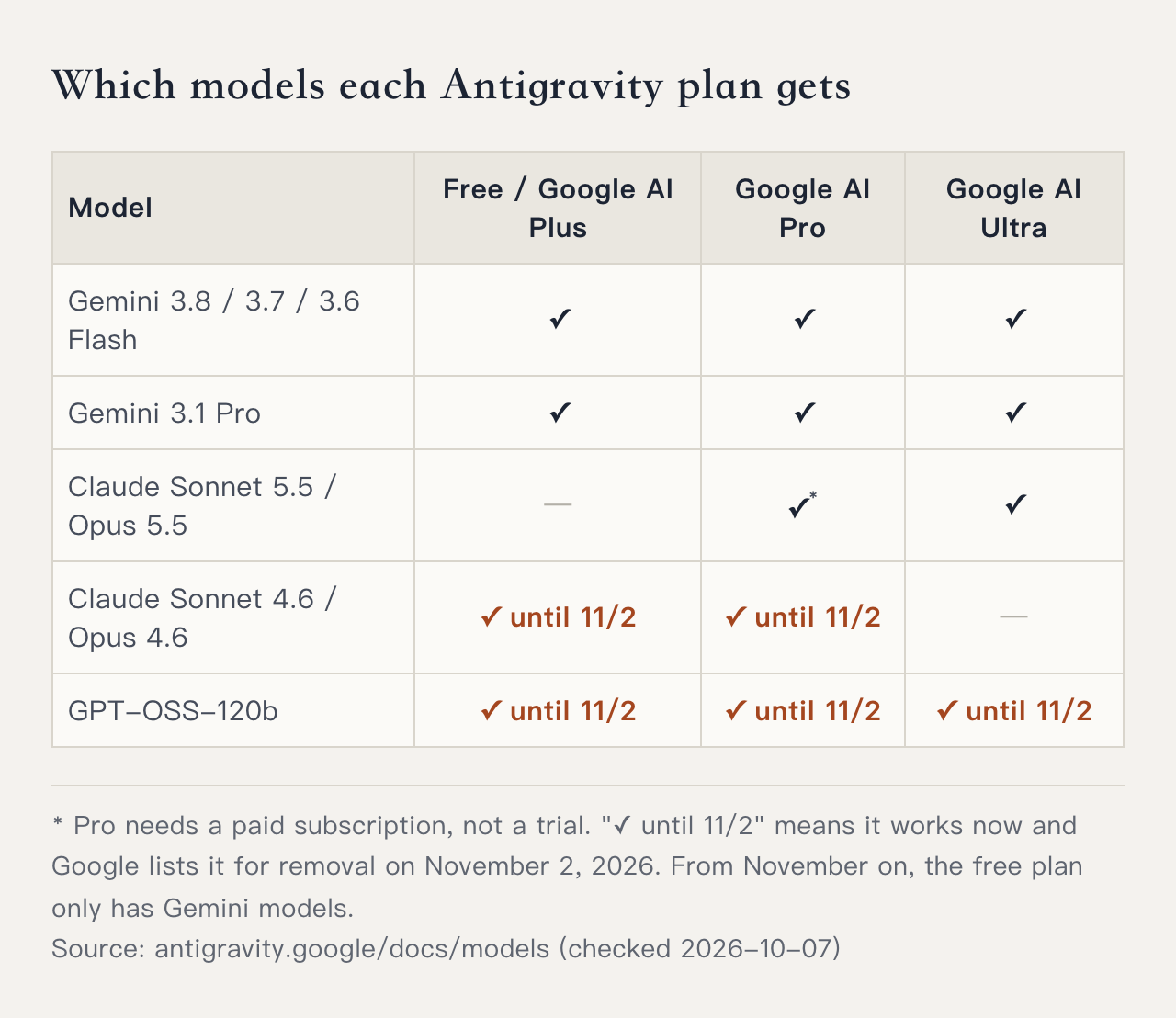
The model lineup depends on your Google plan (see the table below):
Gemini 3.8 Flash and 3.1 Pro come with every plan;
Claude Sonnet 5.5 and Opus 5.5 need Google AI Pro (a paid subscription, not a trial) or Ultra.
The older Claude Sonnet 4.6, Opus 4.6 and GPT-OSS 120B are listed for removal on November 2, 2026.
Pricing (checked 2026-10-07):
・Individual (free): $0, with a basic weekly quota
・Google AI Pro: a higher quota that refreshes every five hours, $19.99/month in the US
・Google AI Ultra: the highest quota, from $99.99/month in the US
・Out of quota: Pro and Ultra users can buy AI credits to keep going
The old standalone $20 Pro plan and the $25 for 2,500 credits option are gone.
What you get now depends on which Google AI plan you have.
Companies go through Google Cloud's business plans.
Before you decide, check antigravity.google/pricing for the current numbers.
2. Cursor 3 (the agent workstation most people use)
Cursor is Anysphere's AI IDE.
Cursor 3 shipped 2026-04-02,
with the interface rebuilt from scratch
and the core idea moving from writing code to managing agents.
What's new:
・Agents Window: several agent chats open side by side
・Parallel runs, and cloud agents pick up the work without breaking the thread
・Design Mode (a built-in design tool)
・Built-in git and multi-repo support
・Improved diff and PR workflow
Pricing: the free Hobby plan is there to try it,
Pro is still $20/month,
and heavy users have Pro+ and Ultra (checked on cursor.com/pricing, 2026-10-07).
It's the hottest tool right now, the biggest community, the most tutorials,
and nine out of ten vibe coding videos on YouTube use Cursor.
3. VS Code + Claude Code (what I built my first three products on)
VS Code is Microsoft's code editor,
free, and the most used one in the world.
Claude Code is Anthropic's official AI coding tool,
and it runs in the terminal (the command line).
Paired with VS Code,
it's the combo behind my first three products.
The biggest difference from Cursor:
Claude Code is terminal-driven,
so you get a black window with white text
where the AI talks with you and edits your files.
What makes this combo land:
1M context (it can read more than a book's worth of code at once)
+ agents and subagents (several AI helpers working at the same time)
+ direct git integration across your whole project.
Claude Code is included in every paid Claude plan:
Pro at $20/month ($17 a month billed annually),
Max from $100.
A free Claude account can't use Claude Code (Anthropic's install docs say so).
Installing it now takes one official command pasted into the terminal,
no Node.js needed first.
The install steps below include the real output.
The learning curve is steeper though,
because you have to get used to talking to AI inside a terminal.
4. Codex (OpenAI's version of the same weapon)
OpenAI's answer to Claude Code.
CLI, the ChatGPT desktop app, VS Code extension, and web are all connected,
so whichever end you use,
sessions and long tasks carry over.
The models are now the GPT-6 generation.
OpenAI recommends GPT-6.1 Sol for complex coding and agent work (released 9/29, close to the flagship GPT-6 Astra at a lower cost),
and GPT-6 Luna for clear, repeatable tasks.
GPT-5.2-Codex, which the earlier version of this page recommended, is deprecated,
GPT-5.4 retired on 8/31, and GPT-5.5 retires on 10/14.
Pricing (checked 2026-10-07):
・Free $0 and Go $8/month: GPT-6 Luna only, lower quota
・Plus $20/month: GPT-6.1 Sol and GPT-6 Luna, plus cloud features such as automatic code review
・Pro $100 / $200 / $500 a month: higher quota
・Or connect your own API key and pay API rates
Plus usage runs in five-hour windows,
and when you run out you can buy credits to keep going,
so keep an eye on usage for long tasks and big files.
5. Manus (from cloud agent to desktop agent)
I used the Manus cloud agent version myself.
That version could run long tasks,
but two things made me switch:
1️⃣ It couldn't touch every file on my computer
Output still had to be moved back into the project by hand.
2️⃣ Credits burned fast, and it got expensive
Manus was credit-based back then,
one complex task ate a big chunk of the balance,
so experimenting meant topping up again and again,
which doesn't work long term for a solo developer.
But Manus turned things around after that:
In 2025-12, Meta acquired Manus for US$2 billion.
By 2026-02, MAU passed 22 million and ARR passed US$100 million.
In March it launched the desktop version, My Computer,
which can now read and write local files and control applications.
Manus also launched a personal agent inside Telegram.
Scan a QR code and it joins your chat.
Its pricing has changed since then too.
It is now a monthly subscription from $20/mo,
with 4,000 credits a month plus 300 free credits every day,
and paying yearly saves 17%.
Check manus.im again before you pay.
In other words,
the thing I complained about back then, not being able to touch files on my computer,
got fixed after Meta took over.
If you want AI to work across your apps rather than just write code,
the new Manus is worth watching.
Bonus: 4 browser-based options
The five above all install on your computer.
If you haven't even opened a computer yet, or you just want a prototype in 5 minutes,
these four vibe coding tools run in the browser alone,
each good at something different.
① Bolt.new: one sentence, a whole full-stack app
A web tool from StackBlitz.
One prompt gives you a running React/Vite project,
with live preview, a terminal, and one-click deploy to Netlify built in.
② v0 (v0.app): Vercel's React UI generator
Give it a text description or a design file,
and it returns production-ready React + Tailwind + shadcn/ui components.
The old address, v0.dev, now redirects to v0.app.
③ Lovable: a full-stack vibe coding platform
A genuinely end-to-end tool from a European team.
UI, backend, Supabase database, and auth in one line,
with one-click push to your own GitHub.
④ Replit Agent: a cloud IDE with a built-in agent
From prompt to a site running on the public internet, all inside the browser,
with hosting built in, so you get a URL the moment it's done.
All four are whiteboard tools.
Prototypes come fast,
but anything you maintain long term
still has to move to a local toolchain (Antigravity / Cursor / Claude Code).
Another 10 tools, where they stand, their pros and cons and who they suit (including the ones renamed, acquired, or shut down)
are collected in this series' tool library:
/series/tools/
So which one should you pick?
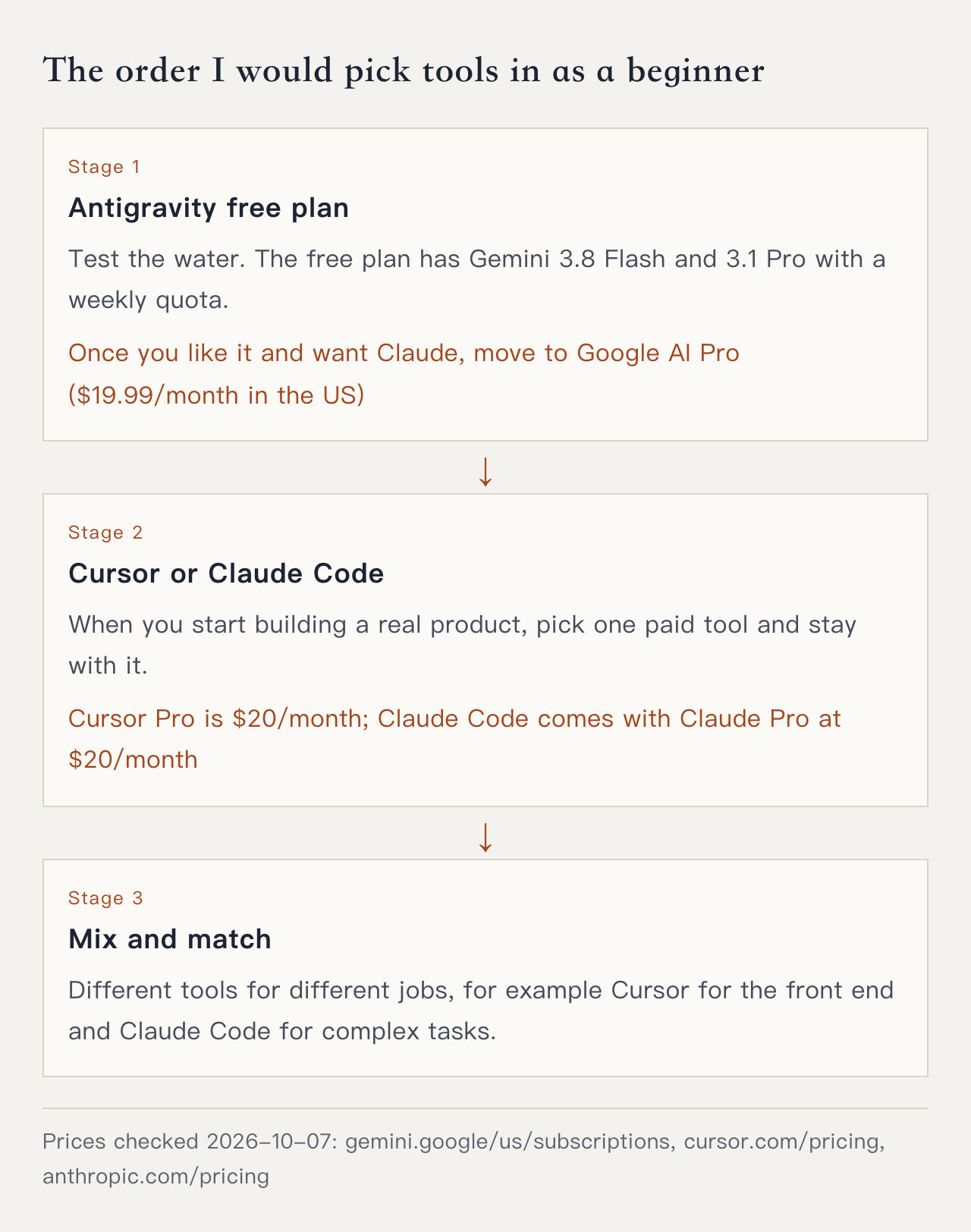
You get Gemini 3.8 Flash and 3.1 Pro without paying,
and the free plan's weekly quota is enough to tell whether you like it.
Once you know you'll stay and want Claude models too,
move up to Google AI Pro ($19.99/month in the US).
Antigravity 2.0 itself is an app for managing agents.
If you want an editor where you can see the code,
install Antigravity IDE as well,
then add two extensions:
If you already subscribe to Google AI Pro / Ultra,
sign in to Antigravity with the same Google account,
which gives you a higher agent quota and more models.
Three months in, once you're comfortable,
you'll have your own preference.
That's when to think about moving to Cursor, Claude Code, or Codex.
Here's the order I'd go in:
Installing Antigravity, VS Code + Claude Code, or Cursor
Pick one of the three.
The steps below use a Mac; where Windows differs, it's noted.
Install Antigravity
Step 1 Download the installer
Open antigravity.google/download and, under Antigravity 2.0, click Download for Apple Silicon. On an Intel Mac click Download for Intel; on Windows pick x64.
Not sure which Mac you have? Apple menu → About This Mac. If the chip starts with Apple M, choose Apple Silicon.
Step 2 Install and open it
Open the downloaded file, follow the installer, then open Antigravity from Applications. If it asks whether to Keep Both or Replace, Google's docs say choose Replace.
Step 3 Sign in with your Google account
If you subscribe to Google AI Pro / Ultra, use that same account so your quota and the Claude models show up.
Step 4 Create a project
Click the folder icon with a "+" in the left sidebar, click New Project, then Add Folder and choose a new empty folder, then Create. The project appears in the sidebar, and the agent can only touch the folders you added.
Step 5 Say your first sentence to the agent
Type your goal in the chat box, for example "build me a personal intro web page", press Enter, and choose Local mode. The agent starts listing a plan and creating files.
If it says your quota is used up, switch to another Gemini model below the chat box, or wait for the quota to refresh.
Step 6 (optional) Install Antigravity IDE and the two extensions
If you want an editor where you can see the code, go back to the download page and install Antigravity IDE, open the extensions panel, and search for Claude Code and Chinese (Traditional) Language Pack. Antigravity IDE's extension marketplace is Open VSX, and both turn up in a search; for Claude Code, pick the one published by Anthropic (checked 2026-10-07).
Install VS Code + Claude Code
Step 1 Install VS Code
Download it from code.visualstudio.com, install it, then use File → Open Folder to open your project folder.
Step 2 Get a paid Claude plan
Sign up at claude.ai and subscribe to Claude Pro or Max. A free account can't use Claude Code.
Step 3 Paste the official install command into the terminal
In VS Code's top menu, choose Terminal → New Terminal, paste this line and press Enter:
curl -fsSL https://claude.ai/install.sh | bashOn Windows, open PowerShell and paste this line instead:
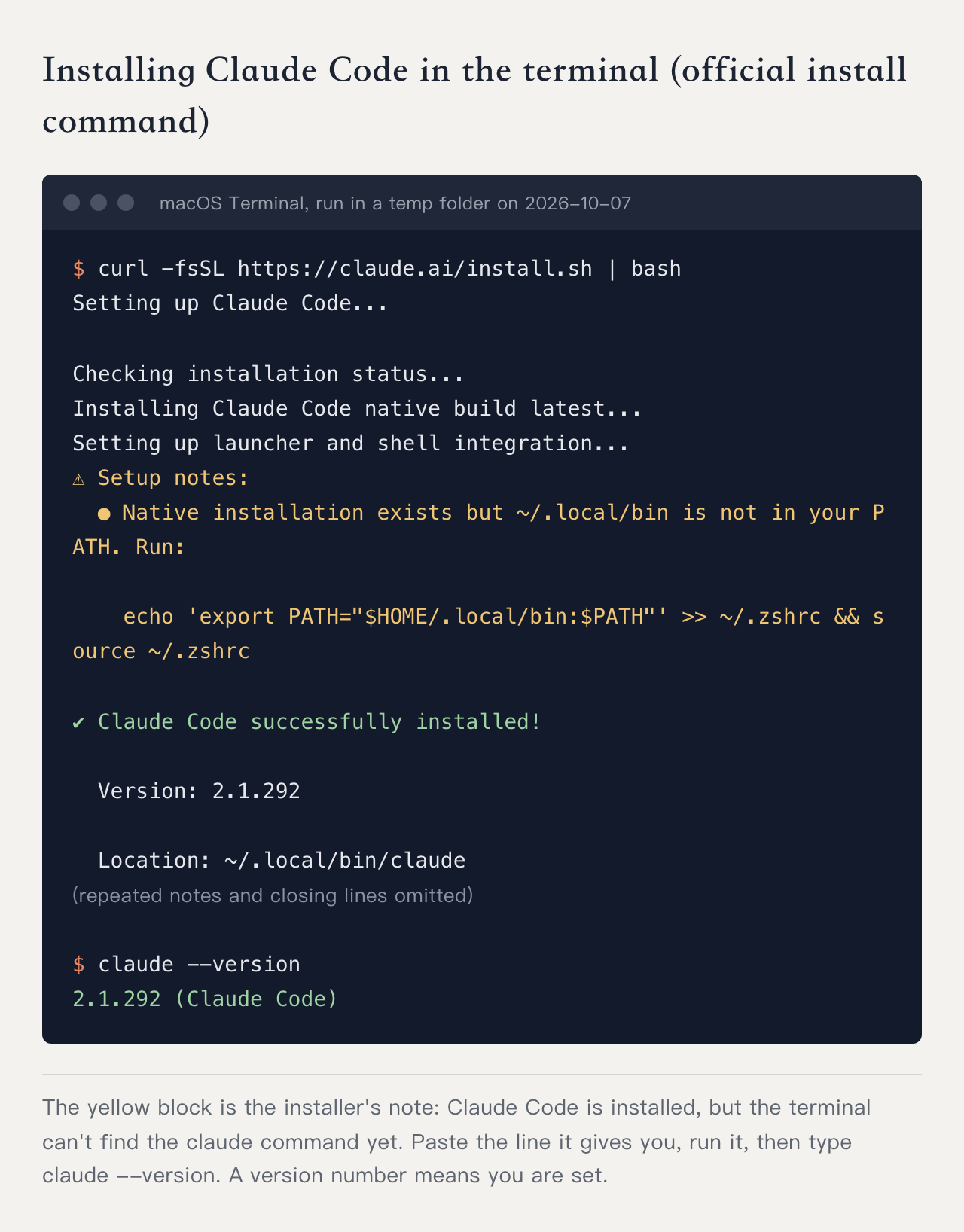
irm https://claude.ai/install.ps1 | iexWhen it finishes you'll see Claude Code successfully installed! and a version number.
I ran it in a brand-new temp folder on October 7, 2026, and this is what came out:
Step 4 Deal with the PATH note (only if you see it)
If, like above, it says ~/.local/bin is not in your PATH, copy the line it gives you and run it:
echo 'export PATH="$HOME/.local/bin:$PATH"' >> ~/.zshrc && source ~/.zshrcStep 5 Check that it worked
Type claude --version. A version number such as 2.1.292 (Claude Code) means it's installed.
If you get command not found, Step 4 usually hasn't been done yet, or the terminal needs closing and reopening.
Step 6 Log in and start talking
In a terminal inside your project folder, type claude. The first time it opens a browser so you can log in to your Claude account; once you're logged in, go back to the terminal and start.
Install Cursor
Step 1 Download and install
Download and install it from cursor.com; the old cursor.sh address redirects there.
Step 2 Create an account
Open it, sign up and sign in. The free Hobby plan is there to try it; move to Pro when you get serious.
Step 3 Open a project and call up the AI
Open a new project folder and press Cmd/Ctrl + L to open the AI side panel on the right, and talk to the Agent there. If the shortcut does nothing, look on screen for the Agent or Chat entry; Cursor's interface changes often.
Wherever you get stuck, screenshot it for the AI
and say: I'm installing Antigravity / Cursor / Claude Code on a Mac and I'm stuck at this step, walk me through it step by step.
The trap vibe coders fall into most
Spending a week researching which tool to pick,
and still not writing a single line of code.
Don't do that.
The differences between the three tools,
for someone who hasn't built a first product yet,
come down to all of them being fine.
Pick one (I'd say Antigravity),
install it,
and tomorrow you can build the first web page from EP.5.
The concepts in EP.0~3 are the foundation,
the tools are just the carpet.
You can swap the carpet any time.
The foundation decides how tall the house can go.
Next episode we get our hands dirty.
In 2026 you won't be writing HTML / CSS / JS syntax yourself.
One sentence to the AI and it's there.
So EP.5 teaches something quite different:
why does the page the AI wrote look like that?
Why are HTML, CSS, and JS split into three layers?
Once you know what each layer is for,
you can point the AI at exactly the piece you want changed.
Add a button, make the button blue, pop up a message on click
are three completely different conversations.
EP.5 is the smallest set of knowledge for speaking the same language as the AI.
So when you give an instruction,
the AI gets it right the first time.
FAQ
Can you use Antigravity / Cursor / Claude Code with no coding experience at all?
Yes. All of them are built so you give instructions in plain language and the AI writes the actual code. Beginners can use them. The difference is the learning curve and the interface style.
Antigravity or Cursor for a beginner?
Both have a free plan to try. Antigravity's free plan includes Gemini 3.8 Flash and 3.1 Pro, and Claude models need Google AI Pro ($19.99/month in the US) or higher. Serious use of Cursor is Pro at $20/month; it has the biggest community and the most tutorial videos, so a beginner finds answers more easily.
What is the difference between VS Code + Claude Code and Cursor?
The biggest difference is the interface. Claude Code is terminal-driven, so you get a black window with white text where the AI talks to you and edits your files. The learning curve is steeper, but it handles the most complex tasks, and 1M context plus subagents are its strong points. Claude Code comes with Claude Pro ($20/month) and up.
Codex or Claude Code, which is better?
Same class of weapon, different camp. Codex is OpenAI's answer to Claude Code. OpenAI now recommends GPT-6.1 Sol for coding (Plus and up) and GPT-6 Luna for repeatable work (on the free plan too). If you already pay for ChatGPT, use Codex. If you don't and you want Claude models, pick Claude Code.
Why not keep building products in the ChatGPT web app?
You can, but every change means another copy and paste, and once you have a lot of files you lose track of which piece lives where. Building a product depends on letting the AI work directly inside your computer, and the ChatGPT web app can't do that.