Every crv feature
What it looks like when AI really watches a video, all shown in the real interface

黃志弘 Leo
Published 2026-09-11 · 1 readers
Start with the 1 minute demo
This clip is a screen recording of crv actually working, and every feature in it gets its own section below:
Feature one: scene-aware frame wallIn the free version
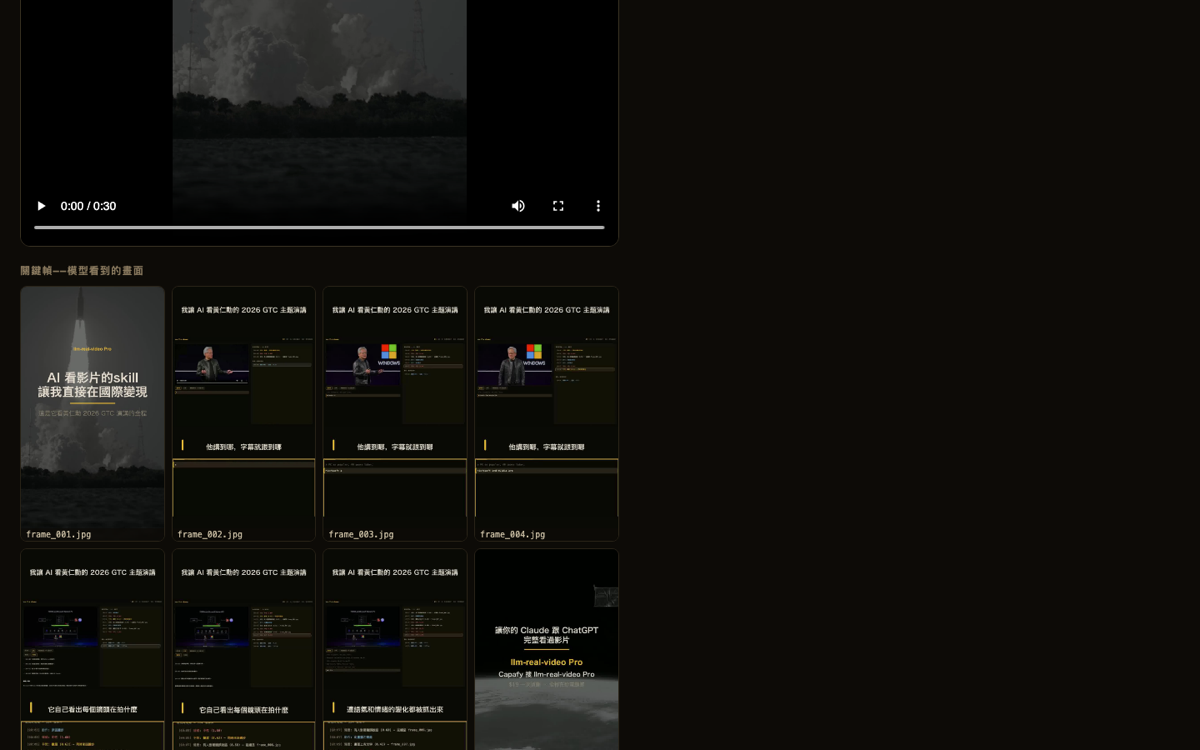
The usual approach is a rigid one frame per second, so a 10 minute video gives you 600 images. crv only grabs a frame when the picture actually changes, then drops the duplicates automatically. The same video usually comes out at 20-60 frames, which cuts the cost of feeding it to AI by about ninety percent, and no shot you needed goes missing. When it finishes it builds a keyframe wall, so you can see at a glance what the AI saw:
Feature two: a transcript that follows the videoIn the free version
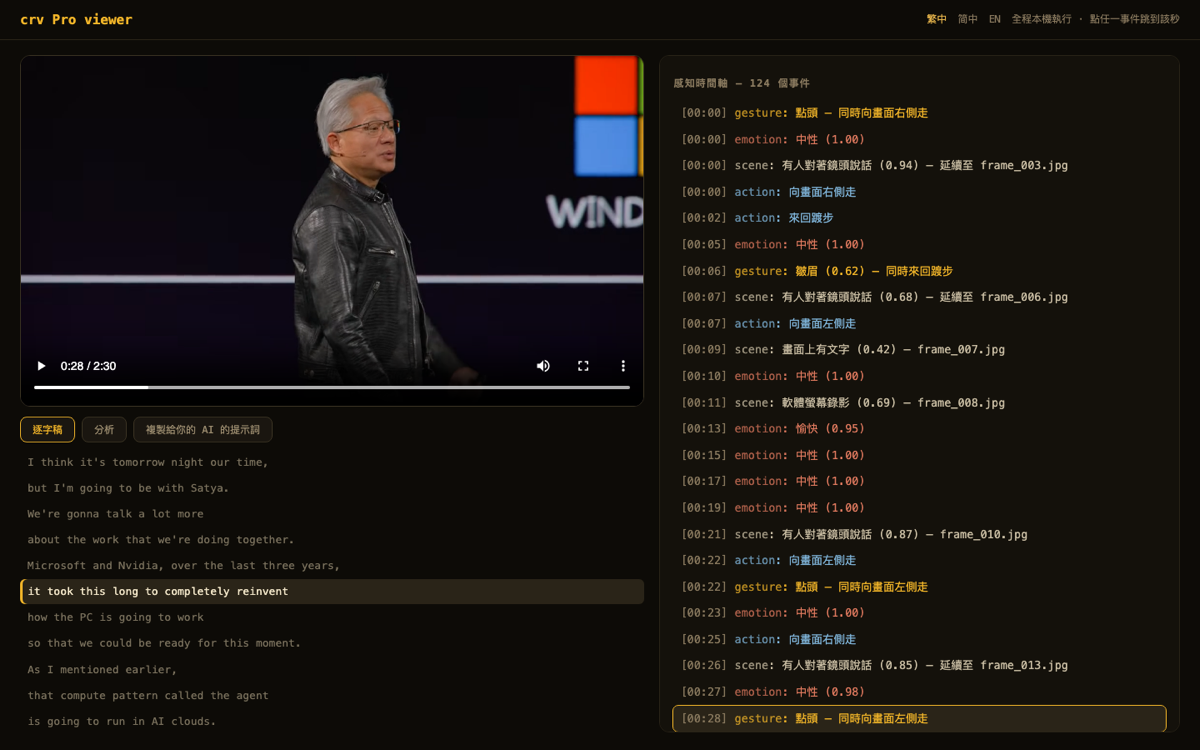
Speech is transcribed locally with Whisper, and every line carries a timestamp. Hit play in the viewer and the line being spoken lights up. Click any line and the video jumps to that second. Finding which minute someone said a given sentence no longer means dragging the scrubber back and forth:
Feature three: perception timelinePro
This is the flagship of the Pro version, and it is the column on the right half of the screenshot above. Everything the frames cannot show gets laid out on a timeline: the second he starts pacing, the second he nods, the second his tone shifts from neutral to upbeat, when the camera pushes in or pulls back, whether the cutting is fast or slow. On this 2 and a half minute Jensen Huang clip it marked 124 perception events. This is the layer you read when you take apart why someone else's viral video holds attention.
Feature four: automatic AI analysis reportPro
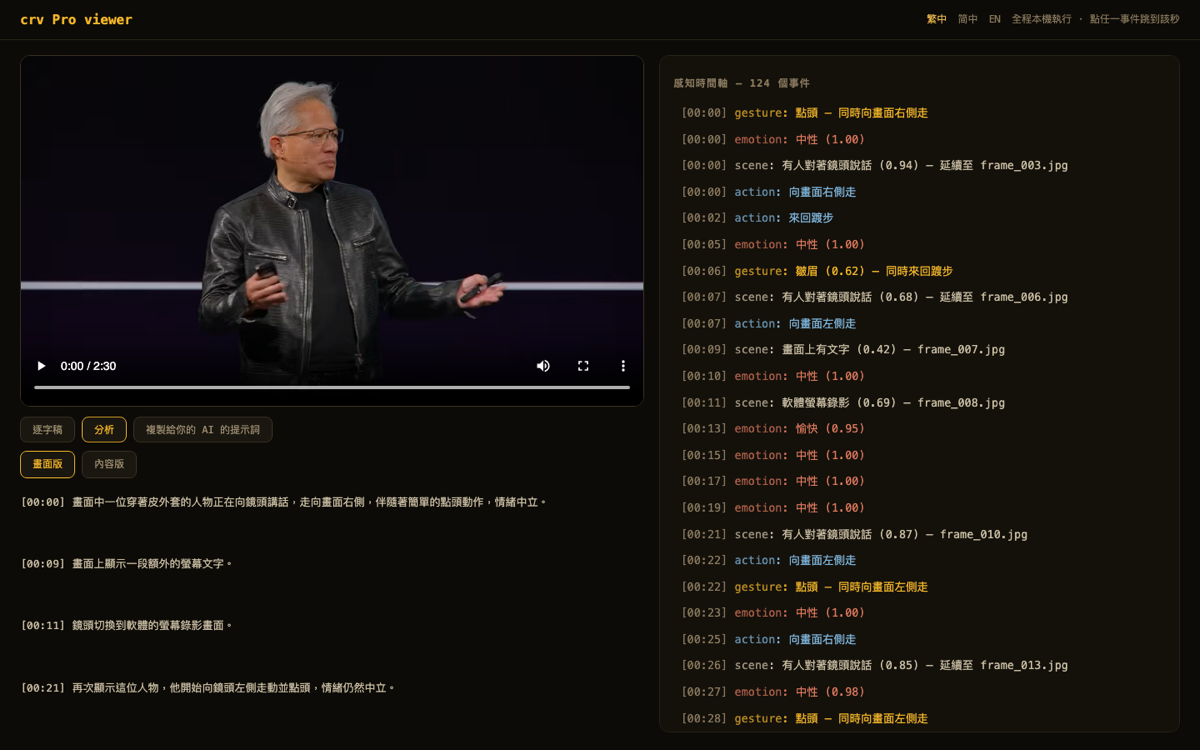
You do not have to piece the conclusions together yourself. It writes two reports for you: a visual report that walks through what happens on screen section by section, and a content report on what the video is saying and which points are worth checking. Both sit in the viewer's analysis tab and are also saved as files, so you can hand them to any AI and keep going:
Feature five: MCP straight into your AI toolsIn the free version
Since 0.8.0, crv is also an MCP server. Once it is installed, inside Claude Code, Claude Desktop, Cursor and other MCP-capable tools you can just tell the AI to watch this video. Keyframes and the transcript go into the conversation automatically, with no running commands and pasting files yourself. One line to install: pip install 'claude-real-video[mcp]', and asking a second question about the same video hits the cache and answers almost instantly.
Feature six: on-screen text recognition (OCR)Pro
Subtitles, title cards and signs inside the video all turn into timestamped text you can quote and search. Names, numbers and jargon the transcription mishears get corrected on the spot by the original text on screen. In short videos packed with title cards, every card becomes data. Chinese, Japanese and Korean recognition is especially strong, and it all runs on your own computer.
Feature seven: cross-video memory searchPro
Every video Pro has watched goes into one searchable index on your computer. Ask in a sentence which video said it, at what second, and what the exact line was, in Chinese or English. Then ask the things only Pro can answer: find every push-in shot you have watched, find the moments the audio model tagged with an emotion, rank the whole library by cutting density. Running a video you already watched answers almost instantly and points back at the existing analysis instead of redoing it. One file on your machine, nothing uploaded.
Feature eight: speed forensicsPro
It finds, section by section, where a video's timeline has been tampered with. Several signals cross-check each other, duplicate-frame fingerprints, motion trajectory continuity and a human-based speed clock, and it marks slow-motion padding, post-production speed-ups and time-lapse shooting section by section with an evidence grade. The design is honest to a fault: it reports evidence only and never says this is normal speed, and built-in fusion rules keep hard sports action and game footage from being wrongly flagged. It passed three rounds of human blind testing before launch.
A few things people keep asking
Privacy: parsing the video and generating the output both finish on your own computer, and the source video is never uploaded. Only the frames or transcript you later choose to paste into a cloud AI reach that service.
Compatibility: the output is just a folder of images and text, readable by Claude, ChatGPT, Gemini, or an open model you host yourself.
Track record: we put the public head-to-head test of crv against one-frame-per-second sampling, failure cases included, in the benchmark folder on GitHub, and anyone can rerun it to check for themselves.
Two ways to start
The free version is open source (MIT) and installs with one pip line. Pro is a one-time purchase ($29) that adds the perception timeline and the analysis reports
Free version on GitHub → Pro version (Capafy) →