Making IG carousel posts with Claude
Basic and advanced, from copy to finished images

黃志弘 Leo
Published 2026-04-03 · Updated 2026-10-08 · 6 readers
The whole thing takes Works on the free plan for NT$0, and comes in 2 paths: basic and advanced.
The four basic parts of an IG carousel
- Slide one is the hook: it makes people stop scrolling. Use a large headline that speaks directly to the reader's problem. If the first slide does not hold attention, the rest is never seen
- Every middle slide says one thing: one point per slide, do not cram. On IG most people swipe through and rarely stop to read closely. More than two lines and they skip it
- The last slide is the call to action: tell the reader what to do next, follow, comment, save, share. Without a clear next step, readers swipe away
- Visual consistency: same fonts, same colors, same layout across the whole set. That is brand recognition, and three seconds is all it takes for someone to know the account is yours
Whether you use Claude, Canva or anything else, the guide below is these four principles in practice.
Basic
A Claude account and a phone or computer
- A Claude account (the free plan is fine)
- On your phone, download Claude App or on your computer open claude.ai
- No design skills, no coding
Copy this prompt, fill in the blanks, send it
Same on phone or computer, just paste it into the Claude chat box.
You are an IG content strategist.
My account is about ___(your niche, for example nail art tutorials)
My audience is ___(your audience, for example women aged 20-35 who want to learn nail art)
Style leans ___(professional / friendly / minimal)
Make me a set of 7 IG carousel slides:
1. Write the copy first, the topic is:___
   Slide one needs a headline that grabs attention
   The last slide carries the call to action
   Keep each slide under 30 characters
2. Then turn the copy straight into HTML carousel cards
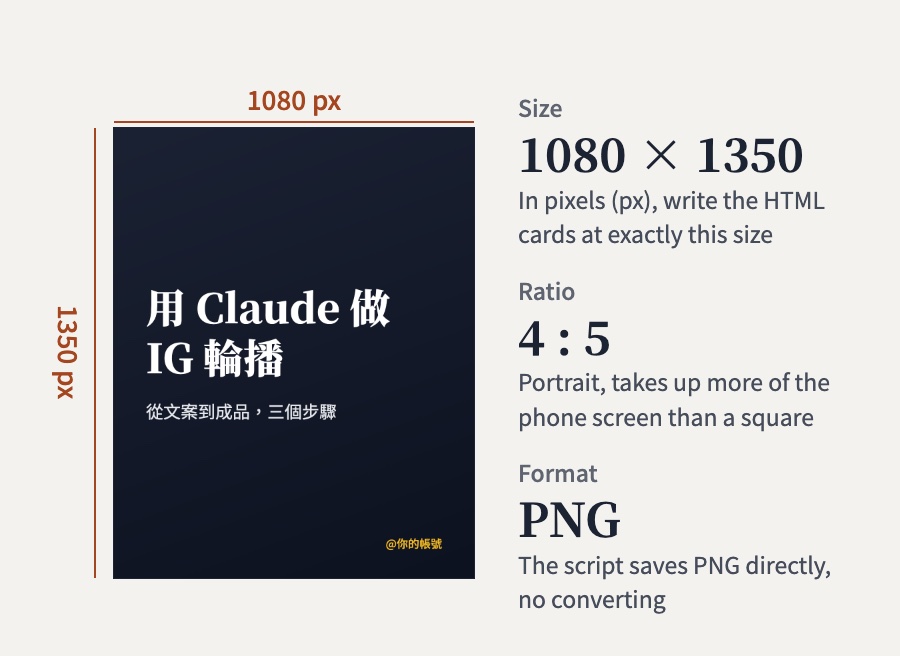
   Each card 1080x1350px (the 4:5 ratio IG carousels use)
   Use a bold serif font
   Text big enough to fill the frame, not much empty space
   Style:dark background, big white text(or any style you want)
   Bottom right corner: @your handle
3. Export them as PNG, highest quality you can"slide three is too stiff, make it conversational" / "bigger text" / "switch the background to warm tones"
A few rounds back and forth is normal, keep going until you like it.
Claude does not nail it every time, do not ship the first output.
• Text too small → "make the headline bigger, fill the frame"
• Layout feels empty → "center the text, less white space"
• Style too plain → send it a carousel image you like and say "use this style as reference"
Generate on your phone → download the PNGs
Everything happens on the phone, with no computer screenshots.
- Open the Claude App on your phone and paste the prompt above (keep the last line, export them as PNG, highest quality you can)
- Claude gives you the PNG files in the chat, one by one
- Open each file and tap Download. On a phone the image opens in the system preview, and you save it to your photos from there
- Once all 7 are saved, open IG and pick those 7 for one carousel post
• The resolution is whatever Claude exported, nothing gets squashed by a screenshot
• No switching between phone and computer
• No crooked crops or stray edges
Claude has a feature called "Code execution and file creation" that makes the image files for you. It is on the Free, Pro and Max plans, works on the web, the desktop app and the mobile app, and is switched on by default.
No PNGs? Tell Claude "export this set as PNGs again, one by one". Still nothing, go to Settings, then Capabilities, and check that "Code execution and file creation" has not been turned off (in the mobile app, tap your name in the left sidebar to open Settings). If that does not help either, take the backup route below.
Generate on your phone → screenshot on your computer
Use this when Claude does not export PNG files.
- Get the set looking right in the Claude App on your phone
- On your computer open claude.ai (same account, the conversation syncs)
- Open the same set on the computer and screenshot each card
Mac: Cmd + Shift + 4, drag a box over each card
Windows: search for Snipping Tool, then drag a box
Claude on your phone + the Canva App
Phone only, no computer needed.
- Paste the prompt into the Claude App on your phone and have it write the copy only (no HTML cards needed)
- Download Canva App (free), search for IG carousel templates
- Pick a template you like and paste in the copy Claude wrote
- Adjust the colors, fonts and background image
- Download straight from Canva → upload to IG
You are an IG content strategist.
My account is about ___(your niche)
My audience is ___(your audience)
Style leans ___(professional / friendly / minimal)
Write me the copy for a 7 slide IG carousel
Topic:___
Slide one needs a headline that grabs attention
The last slide carries the call to action
Keep each slide under 30 characters
I will lay it out in Canva so give me text onlyDownload the Canva App: iOS / Android (the free plan is plenty)
Advanced
If you want higher quality, custom fonts and batch output, this is the method I use myself.
Here is the whole flow: Claude writes all 7 cards into one HTML file, a tool called Playwright screenshots each card into a PNG automatically, and you upload the set to IG in one go.
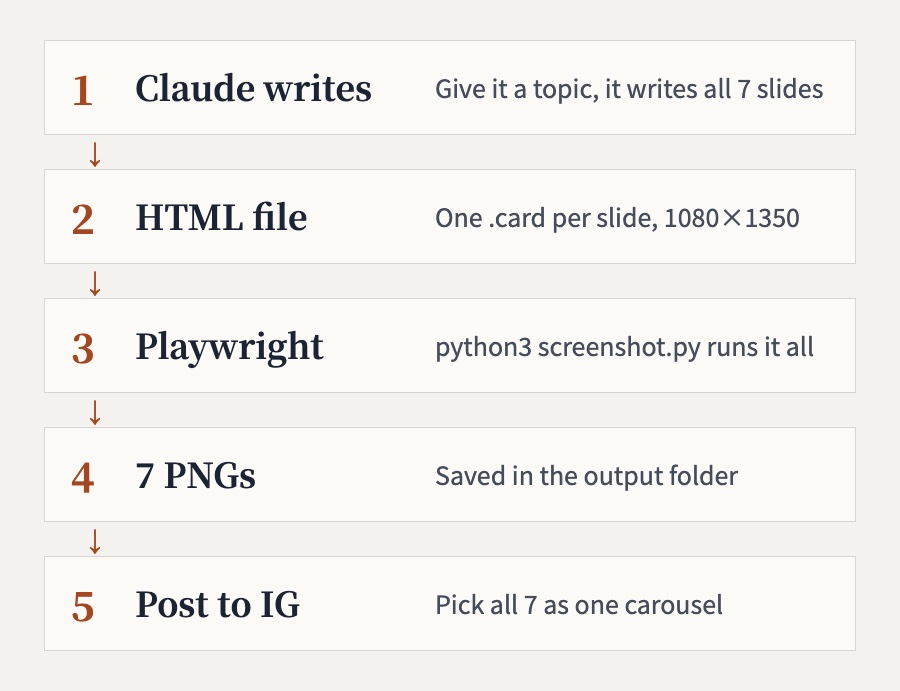
Claude, Python 3 and Playwright
- Claude Code, or claude.ai plus saving the file yourself
- Python 3 and Playwright (for the automated screenshots), installed step by step in steps 2 to 4
- A Mac. Every command in this guide was actually run on a Mac. Windows commands are a bit different and were not tested here, so on Windows the easiest route is to ask Claude Code to install things for you
The downloads take a little while, but once it is installed you never redo it. After that, every new carousel is just step 1 and step 5.
Step 1 Have Claude generate the HTML file and save it in a new folder
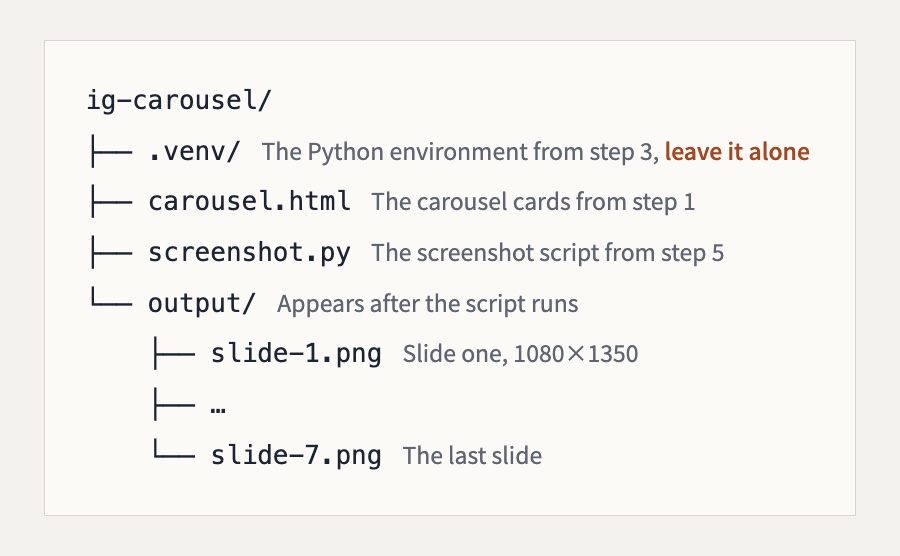
Make a new folder on your Desktop called ig-carousel (right-click in Finder and choose New Folder). Every file from here on goes in this folder.
Then paste this prompt into claude.ai or Claude Code:
Make me an HTML file for a 7 slide IG carousel
Each card is a div with class="card", sized 1080x1350px
Load Noto Serif TC (headlines) and Noto Sans TC (body) from Google Fonts
Background a solid color or gradient, dark
Topic:___
Style reference: dark background, big white text, gold accent #fbbf24
Text big enough to fill the frame
Add page-break-after: always to every div
Give me the full HTML so I can save it as a .html fileClaude gives you a block of HTML code.
1. Copy all of the code
2. Open any text editor (VS Code, Notepad, whatever you have)
3. Paste it in and save it as
carousel.html inside the ig-carousel folder4. The name has to be exactly carousel.html, the script in step 5 looks for that name
If you use TextEdit, the editor built into the Mac, choose Format → Make Plain Text before saving. Otherwise it saves an .rtf file the browser cannot open.
Step 2 Open Terminal and check that python3 is there
Press Cmd + Space, search for Terminal and open it. First move into the folder you just made:
cd ~/Desktop/ig-carouselThis prints nothing, and the prompt at the start of the line changes to ig-carousel %, which means you are now inside that folder. Next, check python3:
python3 --versionIf you see a version number you are good. On the Mac used for testing it printed Python 3.9.6. Your number may differ, that is fine: both 3.9 and 3.14 were tested and everything below worked. If you got a version number, go straight to step 3.
If this Mac has never had the developer tools installed, typing python3 pops up a window asking whether to install the command line developer tools:
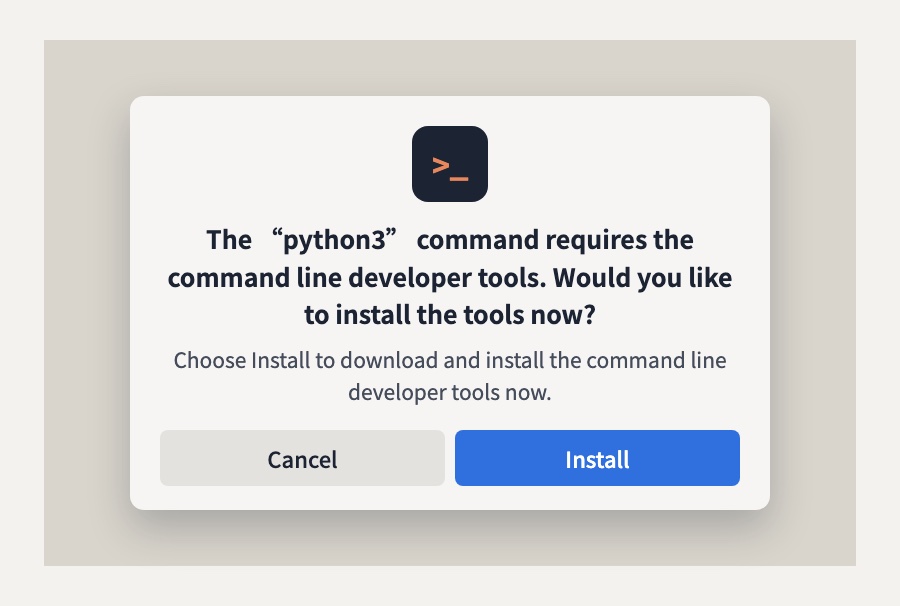
Click Install, then Agree on the license that follows, and the Mac downloads and installs the tools by itself. How long it takes depends on your connection. When it says it is done, go back to Terminal and run python3 --version again. Once a version number shows up, carry on.
Run
xcode-select --install in Terminal to bring up the same installer. If it answers Command line tools are already installed, they are already there and you can keep going.Step 3 Make a Python environment just for this folder
First give this folder its own virtual environment (venv). Playwright gets installed inside this folder instead of into the system Python. Type these two lines in order:
python3 -m venv .venv
source .venv/bin/activateThe first line creates a hidden folder called .venv and prints nothing. The second line steps into that environment, and afterwards the prompt starts with (.venv), like this:
(.venv) ig-carousel %If you see (.venv), you are set. One thing to remember: closing Terminal takes you out of the environment, so next time cd into the folder first and run the source line again.
If you type
pip install playwright straight away, a current Mac often gives you one of these two errors. Either there is no pip command at all:zsh: command not found: pipor, if you installed Python with Homebrew:
error: externally-managed-environmentThe second error message itself tells you to create a venv first. Follow the two lines above and you will not hit either one.
Step 4 Install Playwright and the browser it screenshots with
Check that the prompt starts with (.venv), then type these two lines in order:
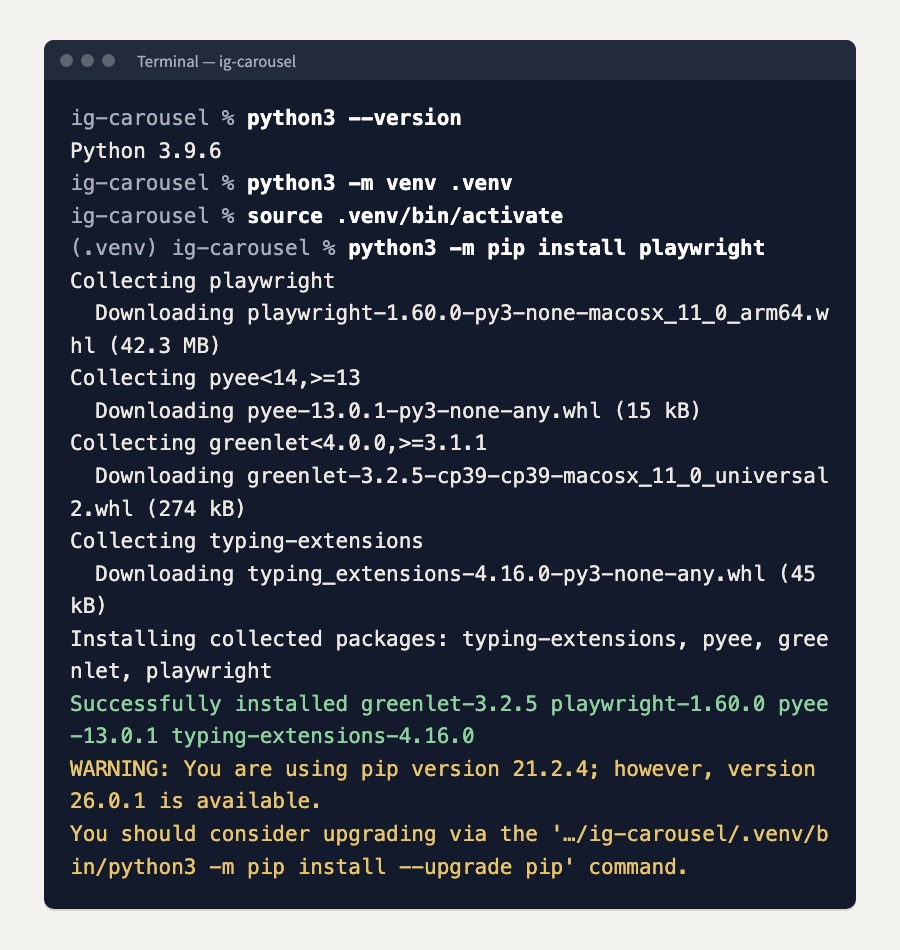
python3 -m pip install playwright
python -m playwright install chromiumThe first line downloads Playwright itself. When you see a line starting with Successfully installed that includes playwright, it is installed. The version number changes over time; on Python 3.9 the test install got 1.60.0. If a yellow WARNING follows saying a newer pip is available, ignore it, it does not affect anything below.
The second line downloads the browser Playwright uses for screenshots, about 260 MB in total, so give it a moment. When the last line says downloaded to, it is done. You only do this once.
If you already use uv, you can skip the venv
If uv (a Python package manager) is installed on your computer, you can skip steps 3 and 4 and type:
uv run --with playwright python -m playwright install chromium
uv run --with playwright python screenshot.pyuv sets up the environment for you and then runs the command. Both routes were tested and gave the same 7 images. uv is a separate install, so if you have not used it, just follow the venv route above.
Step 5 Save the screenshot script and run it
Save the script below as screenshot.py in the ig-carousel folder, next to carousel.html:
from pathlib import Path
from playwright.sync_api import sync_playwright

folder = Path(__file__).parent
html = folder / "carousel.html"
output = folder / "output"
output.mkdir(exist_ok=True)

with sync_playwright() as p:
    browser = p.chromium.launch()
    page = browser.new_page(viewport={"width": 1080, "height": 1350})
    page.goto(html.as_uri())
    page.wait_for_load_state("networkidle")
    cards = page.query_selector_all(".card")
    for i, card in enumerate(cards):
        card.screenshot(path=str(output / f"slide-{i+1}.png"))
    print(f"Done. {len(cards)} images in the output/ folder")
browser.close()As long as screenshot.py and carousel.html sit in the same folder, there is no path to edit. Once it is saved, type this in Terminal:
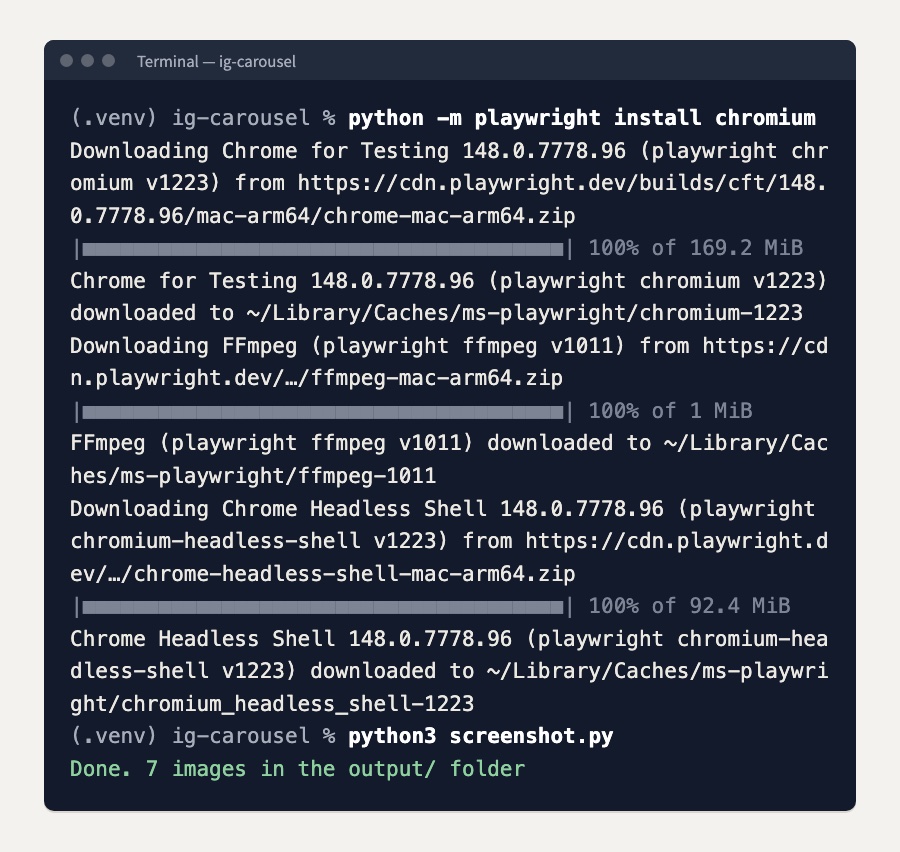
python3 screenshot.pyIt prints "Done. 7 images in the output/ folder", and a new output folder appears holding 7 PNGs at 1080x1350, ready to upload to IG. In testing it took about 3 seconds from pressing Enter to having all 7 images.
•
ModuleNotFoundError: No module named 'playwright': Terminal is not inside the venv. If the prompt does not start with (.venv), run source .venv/bin/activate and try again•
net::ERR_FILE_NOT_FOUND: the script cannot find carousel.html. Check the file name for typos, and that screenshot.py and carousel.html sit in the same folder• "Done. 0 images": the cards in the HTML do not have class="card". Tell Claude "wrap every card in a div with class="card"", save it again and rerun
The three commands to render a new set
With everything installed, a new set goes like this: have Claude write a new carousel.html over the old one, then open Terminal and run:
cd ~/Desktop/ig-carousel
source .venv/bin/activate
python3 screenshot.pyThe new PNGs overwrite the old ones with the same names in output. If the new set has fewer slides, the extra old images stay behind, so if you want to keep the previous set, rename or move the output folder before running.
How it differs from the basic path
- Custom fonts: any Google Font, no longer capped by Claude's defaults
- Precise layout: CSS controls every margin, color and type size
- Batch output: change the copy, rerun once, no re-screenshotting
- Background images: no compression, as sharp as the original
- Consistency: every carousel matches, which builds brand recognition
Fully automatic with Claude Code
If you have Claude Code, one prompt can run the whole flow:
Make me an IG carousel, the topic is "___",
use HTML+Playwright to generate 1080x1350 PNGs,
dark background, white text, gold accents, background image from Unsplash,
font Noto Serif TC, save the screenshots to /tmp/carousel/Claude Code writes the HTML, downloads the background image, runs Playwright and produces the PNGs. You just wait for the result. You can hand it the installs in steps 2 to 4 as well, just tell it "install Playwright for me".
Terms used in this guide
| HTML | The language of web pages. Every page you see is written in HTML. Claude writes it for you, you do not need to understand it. |
| CSS | The language that controls how a page looks: colors, fonts, layout. It works alongside HTML. |
| Playwright | An automated screenshot tool. It opens an invisible browser and captures each card as an image. Free. |
| Python | A programming language. Playwright runs on it. On a current Mac, the first time you type python3 without it installed, the system pops up a window to install it for you (step 2). |
| Command Line Tools | A free set of developer tools from Apple. The python3 on a Mac comes from here. |
| venv | A virtual environment. A Python setup for one folder only; the packages you install live in that folder and leave the system alone. |
| Terminal | Where you type commands on your computer. On a Mac press Cmd+Space and search for Terminal. |
| Claude Code | The advanced version of Claude that can work directly with your files and your computer. It runs in Terminal, and you can also use it in the Claude desktop app. |
| Google Fonts | Google's free font library. Noto Serif TC and Noto Sans TC are the Chinese fonts in it. |
| PNG | An image format. Similar to JPG, better quality, and it supports transparent backgrounds. |
| 1080x1350px | The most widely used IG carousel size (1080 pixels wide, 1350 tall), a 4:5 ratio. IG also accepts 3:4 (1080x1440). The profile grid is 3:4, so a 4:5 image loses a little at the top and bottom there; use 1080x1440 if you want it shown in full on the grid. |
| python3 -m pip install | The command that installs Python tools. You type it in Terminal, same idea as installing an app from the App Store. On a current Mac, step into a venv first (step 3). |